active directory
Try not to get too fancy with Active Directory Backup
Active Directory does a few important things whenever it is backed up or restored to keep it working the way it was intended. For that reason, it pays not to get too fancy with alternatives to a backup that actually involves the directory service.
Update, September 2026: VM-Generation ID can make supported snapshot restores safe from USN reuse; that protection was already available when I wrote this. The failure example below deliberately assumes the restore doesn’t trigger it. A snapshot that preserves replication consistency and a backup you can use to recover the forest are still different things.
When virtual infrastructure first started becoming popular ‘snapshots’ seemed like they might be logical choice as a DR approach, but they were kryptonite for a healthy directory service. Likewise for ‘cloning’ also a bad choice at the time. And now with IaaS hosted VM’s picking up momentum the temptation to use the platform snapshot functionality, cloning or other interesting techniques might be creeping back in.
Two things explain most of the trouble here:
- Update Sequence Numbers (USN’s)
- Domain Controller Invocation ID’s.
USN’s:
Update sequence numbers are assigned to every change (or set of changes) that happen on a domain controller. That could be a change of a persons name, when you add a new domain controller, when the directory service is doing clever things to build replication topology for you under the covers or even when a security descriptor is modified. Everything will be assigned a USN.
Each DC assigns its own local USNs, including when it applies a change received through replication. The originating DC and originating USN also travel with the change. So a local USN from DC1 isn’t directly comparable to a local USN from DC2.
You might see big variation between a brand new domain controller and one you’ve had in the environment for a long time for example.
You can inspect USN’s plenty of ways, but I like looking at the metadata via repadmin:
repadmin /showobjmeta localhost "cn=chad,cn=users,dc=dropbearsec,dc=com"
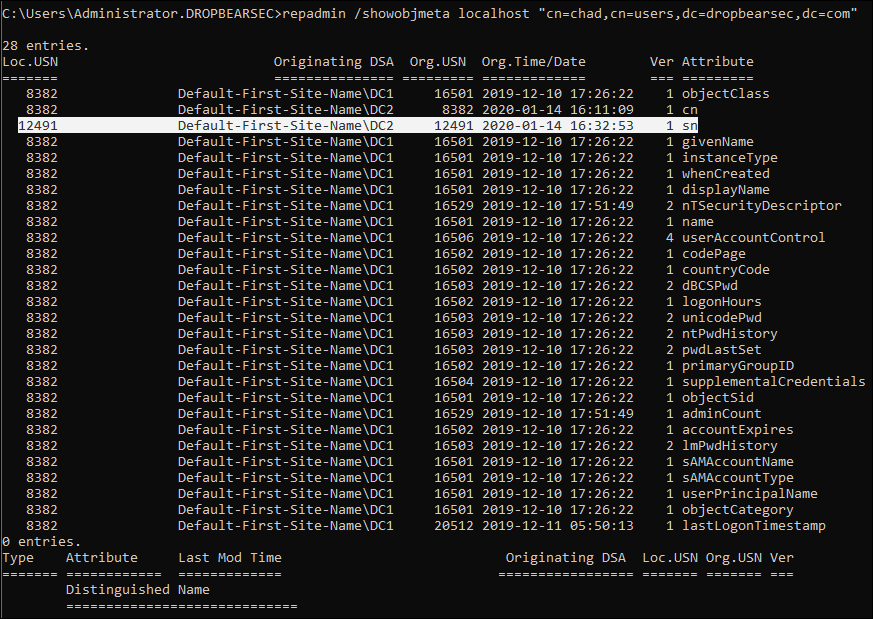
In the example above you can see that when i updated the surname attribute of this object, the local USN on the domain controller processing the change (DC2) was 12491. (From a security context we can also see when the change was made and we could go inspect the event logs on that domain controller to learn more. But that’s not important right now).
The second point is the way replication works (at a high level) for AD: Domain controllers pull changes.
So, the next time DC1 wants to replicate with DC2 it will say: “Give me everything that happened since your Update Sequence Number (USN) 12491…. (called the “high watermark value”).
Now, consider a snapshot restore that rolls the database back without changing its invocation ID. We’ll keep backup age out of this example; restoring a DC from a backup that’s too old brings its own problems.
- When the replication window opens, DC1 is going to be asking DC2 for changes that happened since the last sync (before the snapshot was used to recover the domain controller).
- We can assume that the number is something much larger than 12491 since lots of changes will have happened on this domain controller in the meantime. Lets say its only 12591; that is, 100 changes have happened since the original snapshot was made (it will probably be an order of magnitude more).
- DC2, restored from snapshot appears healthy and will probably process changes like a good domain controller. But do remember that DC2’s local USN table is back at 12491 because we restored from a snapshot.
- 100 new changes happen on DC2 but unexpected behaviors start to appear in the environment. Maybe someone who was married and chose to change their name has it appear differently at different times; maybe logins fail due to wrong password or computers say “unable to establish secure channel”…. The changes after this 100 replicate as usual and the directory appears normal.
- Remember, Domain Controllers pull changes. DC1 already believes it has changes through USN 12591 from this database incarnation, so it asks for changes after that point. Those 100 newly reused USNs don’t tell it that anything is missing.
- It is called USN Rollback, and it is going to hurt.
It is important to mention at this point that I’m being a little dramatic. Microsoft ‘fixed’ this as best they could a while back and the fix is in all currently supported versions of Windows Server. But let me go a step further and say that the symptoms mentioned in the 4th bullet are the best cases. It is the things domain controllers do under the covers that could really mess up your directory in unpredictable and potentially non-recoverable ways.
The fix?
Windows detects USN rollback and quarantines the affected DC. Look for Directory Service event 2095 and Dsa Not Writable set to 0x4; Net Logon is paused to prevent it accepting changes it can’t safely replicate. Detection doesn’t put missing changes back, and a clean-looking repadmin result alone doesn’t prove the databases agree. Microsoft’s rollback article explains both the symptoms and recovery options. Removing the quarantine value isn’t a repair.
USN rollback is well documented in this knowledge base article:
Domain Controller Id:
The other important component is the domain controller invocation id. In short, this is how replication partners will get along with an AD recovery that is performed in a supported manner. You can see the invocation id in the replication metadata output for each domain controller, in this example - DC1:
repadmin /showreps DC1
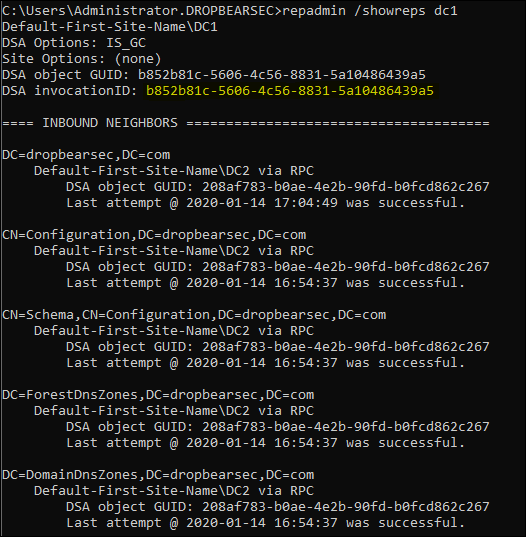
In the simplified USN example, the missing piece was the invocation ID. A supported restore gives the database a new invocation ID, so its replication partners can distinguish this incarnation from the one they saw before. The same USN under a new invocation ID isn’t treated as a change they’ve already received. That’s what allows the restored DC to resume replication without silently reusing its old identity.
Are there any Hacks?
Yeah. There are. But Microsoft is clear that the procedure is not supported and should be reserved for situations where there is no other alternative: restore a previous version of a virtual domain controller VHD. You shouldn’t build your strategy around this technique.
One correction to the original note: DSA Previous Restore Count is a value you inspect to confirm a restore was processed. It isn’t the switch that asks AD to treat the database as restored. The documented procedure uses Database restored from backup, under HKLM\SYSTEM\CurrentControlSet\Services\NTDS\Parameters, and involves booting in Directory Services Restore Mode. Read the complete virtual DC restore procedure for the particular failure you’re dealing with; changing the counter alone won’t repair USN rollback.
But what about the VM-Generation ID?
You got me. Windows Server 2012 introduced VM-Generation ID support in cooperation with hypervisor vendors, allowing AD to recognise certain restores and handle them safely.
AD stores the hypervisor’s generation identifier in its database. If a supported restore changes the identifier, the DC notices the mismatch, changes its invocation ID and discards its RID pool. That avoids reusing the old replication identity and previously allocated RIDs. Microsoft’s virtualized domain controller architecture documentation spells out which operations trigger the protection and what still needs recovering.
[For context, the attribute holding the id is: msDS-GenerationId.]
So what you’re saying is…
The point I’m getting at: it seems foolish (to me) to rely on protections for snapshot style backup. If you have the chance to design your DR strategy from scratch, choose an option that leverages the backup API and you’ll have a fully supported backup that’s been tried and tested over the ~20 years active directory has been around. Even with the modern improvements, basing your strategy around alternate approaches seems less than ideal to me. (My recommendation would be to do both if my cloud or virtualization admins really had a thing for the snapshot functionality provided by the platform).
One useful thing to inspect is repadmin /showbackup. AD-aware backups update backup metadata for the directory partitions, so this can help distinguish a backup AD knows about from a disk copy it doesn’t:
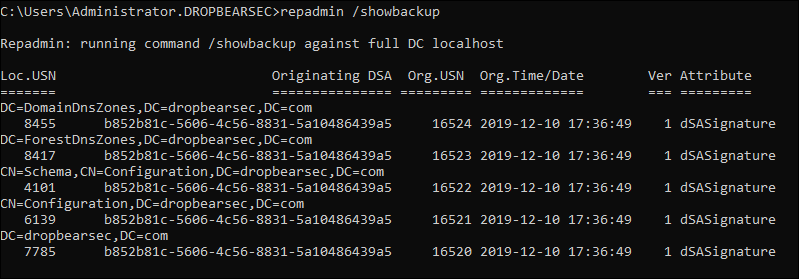
That timestamp isn’t a restore test. It doesn’t tell you whether the backup files still exist, whether their decryption keys are available, or whether you can recover SYSVOL and a working first DC in an isolated network. Those are good things to find out before you need the backup.
Thanks!