active directory
LDAPS across disparate namespaces
An annoying little lab problem: the name you use to reach a machine has nothing to do with the AD domain you’ve installed on it. LDAP works, but LDAPS isn’t pleased about the certificate. Here’s the setup:
- You have test infrastructure available that you connect to with a unusual name; the namespace has nothing to do with the namespace you are building. IaaS is a good example. You might connect to something like ec2-101-114-192-110.ap-southeast-1.compute.amazonaws.com over the Internet.
- You’ve deployed Active Directory Domain services onto that IaaS host.
- The client has network access to the machine, for example over a VPN into the lab. LDAPS itself needs TCP 636; this isn’t a reason to open every domain service.
- You need a client to connect to the domain with LDAPS (port 636).
Since this is a lab scenario, you can be deliberately simple in your approach for enabling LDAPS on the new domain controller.
Simply:
- Install Certificate Services Role on the domain controller.
- When configuring the role, accept the defaults but ensure you choose an ‘Enterprise CA’
- Root CA
- Leave everything else default.
- Reboot the domain controller.
The domain controller has automatic enrollment rights for a certificate type that includes ‘server authentication’.
It will pick up the new certificate on reboot and the LDAPS port should be bound to the new certificate after certificate auto-enrollment completes.
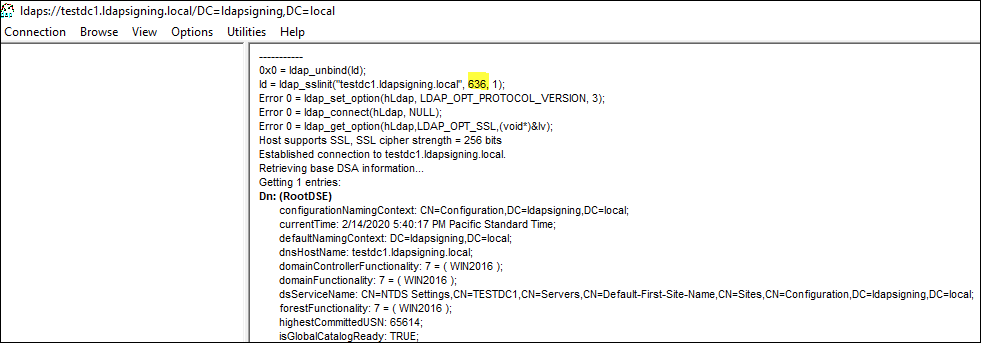
- Test by opening ‘ldp.exe’ on the domain controller.
- Choose to “connect”
- Choose port 636
- Tick the SSL box.
If everything works here (it should), the server is ready to serve up LDAPS and is doing so.
The outstanding problems for external clients are:
-
Clients currently connect via ec2-101-114-192-110.ap-southeast-1.compute.amazonaws.com, so the certificate subject name won’t match.
-
The default lab CA configuration of the Certificate Authority mentioned above won’t put the CRL anywhere that the client can access. Some LDAP clients, including LDP are going to be upset about that.
-
A client outside the domain won’t automatically trust the new lab CA. It needs the CA chain in the trust store used by that LDAP client.
Fortunately, you can solve the issues pretty fast.
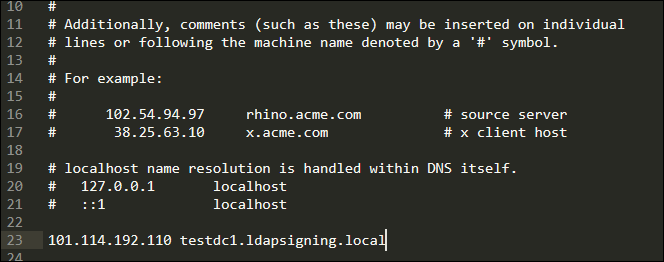
The first one is easy right? It’s a lab, so a hosts-file entry will do. On Windows that’s C:\Windows\System32\drivers\etc\hosts. Map the DC’s FQDN from the certificate to the lab IP, then use that FQDN in the LDAP client. Mapping just the AD domain name doesn’t help if the certificate is for dc1.example.com and you connect to example.com.
The second one is still reasonably straightforward.
All we need to do is make that CRL available. To do this in a lab:
- Add the Web Server role on the Domain controller with all the defaults.
- Inspect the DC certificate’s CRL Distribution Points extension first. If it contains an HTTP URL ending in
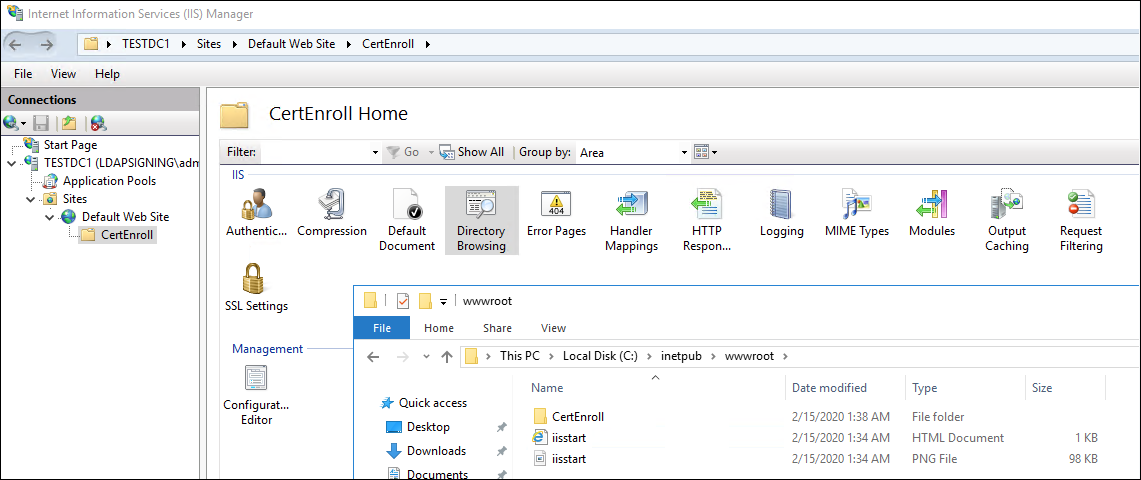
/CertEnroll/<filename>.crl, createC:\inetpub\wwwroot\CertEnrolland publish the CRL at that exact URL. Creating a web folder doesn’t add a missing HTTP distribution point to a certificate; that requires configuring the CA and issuing a new certificate. - Just to make things easy to see,test and poke open IIS manager, navigate to the default web site, CertEnroll, then enable directory browsing. (This is not needed or advised, this is lab laziness)
- Then. open the Certificate Authority manager.
- Right click on “Revoked Certificates” and choose to issue a new Certificate Revocation List.
- Copy your new CRL from C:\Windows\System32\CertSrv\CertEnroll to c:\inetpub\wwwroot\certenroll.
- Then, open a browser and confirm for yourself that you can access the CRL.
- Try it from your client outside of the IaaS environment.
Install the lab CA’s root certificate in the client’s trusted roots too, with any required intermediate certificates. Then test again. Name matching, chain trust and revocation retrieval are three different failures even when the LDAP client gives you the same unhelpful connection error. Microsoft’s LDAPS certificate requirements are a useful checklist here.
Once TLS connects, bind as the intended LDAP user as a separate test. A successful TLS handshake doesn’t prove that the credentials or directory permissions are right.
Before anyone gets too upset: this is a deliberately cramped lab setup. I wouldn’t put the DC, CA and web server together like this for production. I needed this on an internal network today; the AWS name was just an easy way to illustrate the mismatch.