read

First, the important bit: you should generally not do this in production. The schemaUpgradeInProgress behavior is powerful and risky, so this note is best treated as a lab explanation of how Active Directory protects certain system-owned attributes.

Active Directory marks some attributes and objects as system-owned for good reasons. Those constraints protect directory consistency. Bypassing them can leave behind a mess that replicates everywhere, which is an exciting way to turn one bad idea into a forest-wide bad idea.

That said, there are rare recovery scenarios where an administrator may need to understand the schemaUpgradeInProgress operation. Microsoft documents this operation in the Active Directory Technical Specification as a way to cause a domain controller to skip certain constraint validations for the LDAP connection where it is set.

MS-ADTS: schemaUpgradeInProgress

Treat this as last-resort repair knowledge, not a normal administration pattern.

What it does

When schemaUpgradeInProgress is set to 1 on the root DSE for an LDAP connection, the domain controller treats that connection as being in a schema-upgrade mode. In that mode, some constraint validations are skipped for modifications performed through that connection.

That is why it can permit changes that Active Directory would normally reject as system-owned or otherwise protected.

The risk is exactly the same as the appeal: the directory may allow a modification it was trying to prevent.

Before touching it

Pause and make sure all of this is true:

  • You are in a lab, or Microsoft/vendor support has directed the change.
  • You know which object and attribute need to change.
  • You know why the normal administrative tool cannot perform the change.
  • You have a tested rollback plan.
  • You have a recent system-state backup of the affected domain controller.
  • You understand replication impact.
  • You are connected to the intended domain controller.

If any of those are not true, stop. This is not a good place for improvisation.

Setting schemaUpgradeInProgress with LDP

The original lab workflow used LDP.exe.

  1. Make sure your account has the required schema-level rights.
  2. Launch LDP.exe.
  3. Connect and bind to the intended domain controller.
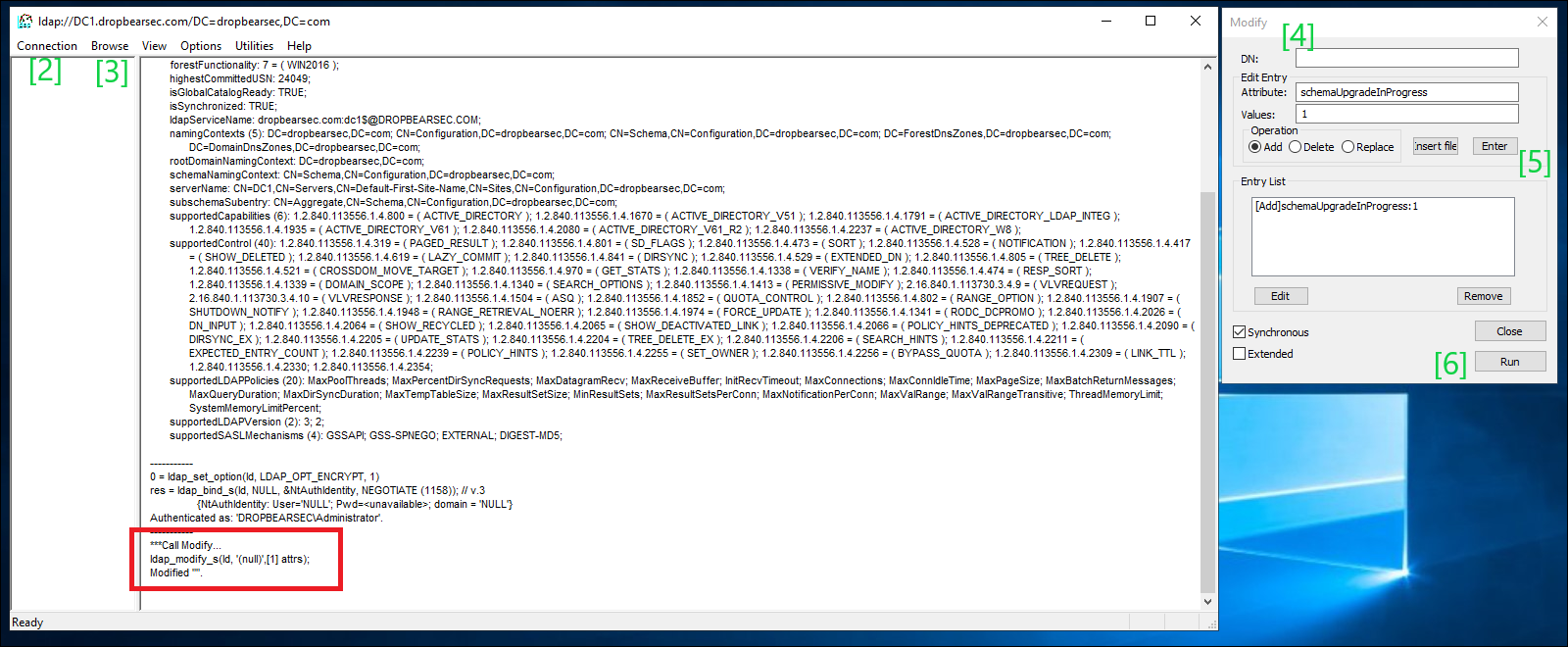
  4. Open Browse and choose Modify.
  5. Leave the DN blank. This targets the root DSE.
  6. Set the attribute to schemaUpgradeInProgress.
  7. Set the value to 1.
  8. Choose the Add operation.
  9. Click Enter, then Run.

schemamod

After that, perform only the specific repair operation you intended to perform. Do not leave the session open and keep making changes because the directory now seems more cooperative.

Turning it back off

Return the connection to normal behaviour as soon as the repair is complete.

In LDP.exe, again modify the root DSE and set:

schemaUpgradeInProgress: 0

Use the same attribute name when disabling it. The original note had a typo in the final step; the operation is schemaUpgradeInProgress, not schemaUpdateInProgress.

Then close the LDAP connection.

Safer alternatives

Before using this operation, check whether one of these is the right answer instead:

  • Use the supported management snap-in or PowerShell cmdlet for the object type.
  • Use Restore-ADObject or Active Directory Recycle Bin for deleted objects.
  • Use authoritative restore for disaster recovery scenarios.
  • Apply a vendor-provided fix or Microsoft support procedure.
  • Rebuild the object cleanly if the blast radius is lower.

The purpose of this post is not to make schemaUpgradeInProgress look convenient. It is to make the risk visible enough that, if you ever need it, you use it deliberately and get out quickly.

References

Blog Logo

Chad Duffey


Published

Image

Chad Duffey

Blue Team -> Exploit Development & things in-between

Back to Overview