aws
Infrastructure Notes - AWS Route 53
Working through Ben Piper’s excellent course on Pluralsight: AWS Networking Deep Dive: Route 53 DNS. This post captures the notes I took along the way.
Introduction
If you’re reading this, you probably know what Route 53 is. The part we’re interested in here is authoritative DNS: hosting the records for a domain and deciding which answers to give clients.
Route 53 does three related but distinct jobs:
- Domain registration, where Route 53 can act as the registrar for a domain.
- Authoritative DNS hosting, where hosted zones contain the records resolvers query.
- DNS-aware traffic steering, where routing policies and health checks influence the answers Route 53 returns.
Keeping those roles separate helps when troubleshooting. A registrar problem, delegation problem, hosted-zone record problem, and health-check problem can all look like “DNS is broken” from far away.
DNS Refresher
There are many analogies around phonebooks for domain names to IP addresses, and that explanation is valid, and works well for general discussion. But its important for infrastructure engineers to remember that more accurately: DNS is a database of domain name resources. IP addresses are a resource for sure, but they are not the only resource type in a DNS zone. IPv4 Addresses are generally the A but the resource could just as easily be an IPv6 address, or a txt record:
| Domain Name | Resource Type | Resource Data |
|---|---|---|
| chadduffey.com | A (IPv4 Address) | 10.10.10.10 |
| facebook.com | AAAA (IPv6) | 2a03:2880:f101:83:face:b00c:0:25de |
| microsoft.com | TXT (Text) | “facebook-domain-verification=m54hfzczreqq2z1pf99y2p0kpwwpkv” |
DNS is scaled by distributing zones between name servers through delegation. For chadduffey.com., a resolver with an empty cache can ask a root server where .com is, ask a .com server where chadduffey.com is, then ask one of the domain’s authoritative servers for the record.
Those referral-following queries are iterative. The recursive part is the service the resolver provides to my client: I ask it for the answer and it does that work for me. Usually it can answer some or all of the question from cache. DNS terms in the Route 53 guide.
Domain Name Registration
Working with jmpesp.xyz as my example:
- Registrar (godaddy) confirms availability with the company managing the.xyz Top Level Domain (TLD) (For context, XYZ.COM and CentralNic manage this one)
- Registrar creates registration with company managing the .xyz TLD
- Registrar tells the company managing the .xyz the name servers that should be authoritative for the domain I am registering. (usually starts as the name servers of the registrar)
- The .xyz registry publishes the delegation to the chosen authoritative name servers. The registrar submits that information to the registry; they’re different roles.
Route 53 public hosted zones and reusable delegation sets
- Route 53 will use four different name servers each time you create a new public zone.
- This is fine for a single domain setup, but for larger services, a feature called a reusable delegation set is available.
- This example uses PowerShell:
$delegationset = New-R53ReusableDelegationSet -CallerReference ([guid]::NewGuid().ToString()). It isn’t PowerShell-only; the AWS CLI and API support it too.

- This set of nameservers can be associated with up to 100 zones.
- Get the id: “$dsid = $delegationset.DelegationSet.Id”
- Set the zonename:
$zonename = "jmpesp.xyz." - Create the zone: “$zone = New-R53HostedZone -Name $zonename -DelegationSetId $dsid -CallerReference (Get-Random)”
- Optionally, view zone information “$zone.HostedZone” (or nameservers with “$zone.DelegationSet.NameServers”)
Actually, while we are here, don’t forget that answers can be cached on both the client (a Windows machine in my case) and its recursive resolver. The TTL belongs to the record set, not to the zone as a whole. ipconfig /flushdns clears the Windows cache; it won’t clear your ISP’s resolver cache. Lower the TTL before a planned cutover, then allow the old TTL to elapse.
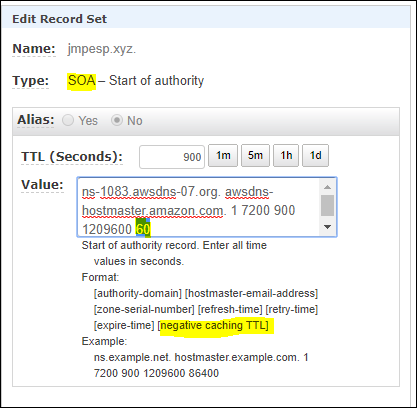
Another important point is the negative caching TTL (when you query for something that doesn’t exist and rather than having the client keep asking, the negative ttl record just says - nope, already tried, doesn’t exist) which is defined and modified if needed on the SOA:
CNAME v Alias: CNAME is the DNS record type; alias is a Route 53 feature that lets AWS answer with the relevant target values for supported AWS resources.
APEX record: A record at the root of the zone itself, like jmpesp.xyz.
Why call out that first distinction for alias v CNAME (sounds like just terminology)? Because there are alias records that are not CNAMEs. Like the example below where the apex is an alias record despite being an A type resource. This matters because standard DNS does not allow a CNAME at the zone apex, but Route 53 alias records can solve that AWS-resource use case cleanly.
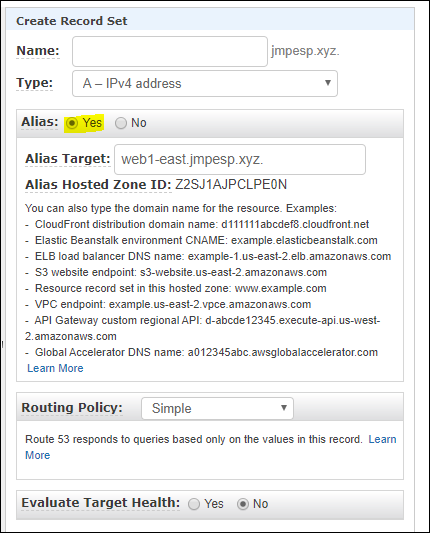
What about wildcard records? anything.jmpesp.xyz -> (alias) -> www.jmpesp.xyz
Health Checks (for DNS load balancing):
HTTP, HTTPS or TCP (can do more than just web services)
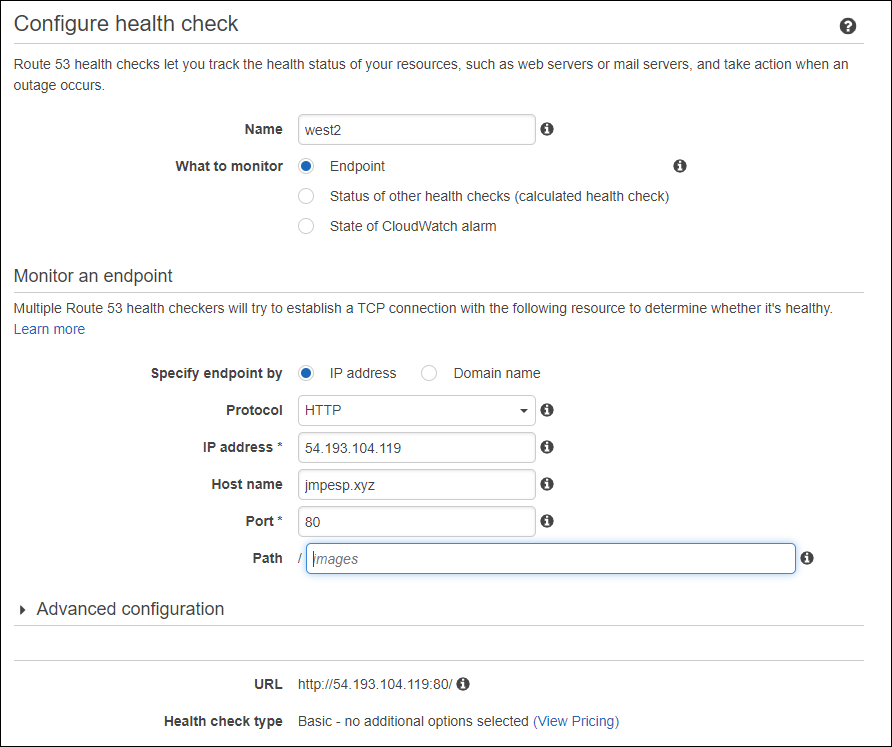
We should see the Amazon health checkers retrieving the test page that we configured in the health check.

Some tips:
- Health checks are typically HTTP requests. If the instance is under powered this will have a non zero effect on the service.
- You could consider removing some of the health checkers to further reduce the load. (By default health checkers from most regions are included so you have multiple servers checking in on your web server every X seconds)
- To reduce load, increase the checking interval. Shorter intervals mean more requests.
- Make sure the health endpoint tests something meaningful. A static “OK” page might prove the web server is alive while the real application is broken.
- Think about failure modes before lowering TTLs everywhere. Low TTLs can help failover, but clients and recursive resolvers do not always behave exactly the way your whiteboard says they will.
Which routing policy should I use?
As a rough decision guide:
- Use simple routing when there is one answer and you do not need health-aware steering.
- Use failover routing for active/passive designs where one target should only be used when the primary is unhealthy.
- Use weighted routing for gradual migrations, canaries, or deliberate traffic splits.
- Use latency routing when users should generally land on the lowest-latency regional endpoint.
- Use geolocation/geoproximity when business, compliance, or content requirements depend on geography rather than pure latency.
- Use multivalue answer routing when you want DNS to return multiple healthy IPs and let the client choose.
Route 53 can chain these patterns, but each layer makes incident response harder. Draw the intended decision tree, include TTLs and health checks in the drawing, and test failure before calling the design complete.
Failover Records
Once we have the health check, we can associate it with a alias target to be used for failover.
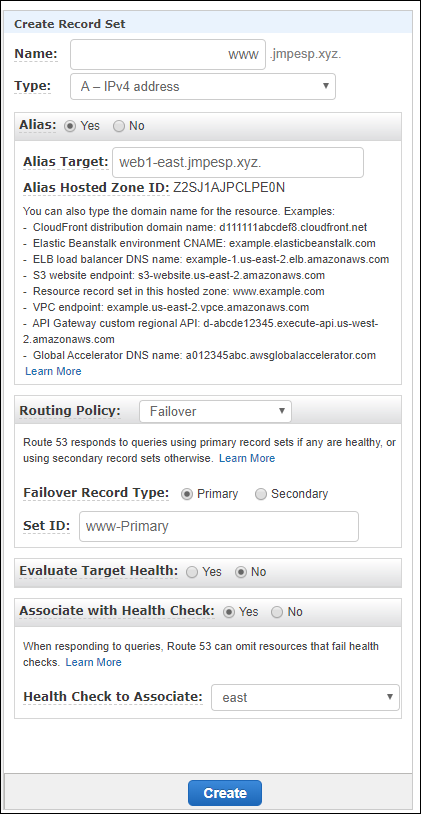
For the simple example, the resulting records will look like this:

It gets interesting when you start to chain these together. It is recommended to carefully draw out the desired configuration before messing in the Route 53 DNS manager but as an example, we could create two east.jmpesp.xyz records. Then, create the same in a West region (west.jmpesp.xyz). Then, we could set up www.jmpesp.xyz to point to the geography alias records, then have route 53 “evaluate target health”, but not rely on a health check for the new alias records. We’d get redundancy spread across all geographies.
We can also keep a static “we’re having trouble” page in an S3 bucket and make it a failover target. For direct S3 website hosting, the bucket name needs to match the requested hostname, such as www.jmpesp.xyz, and the website content needs to be publicly readable. Select the website endpoint for the bucket’s region when creating the Route 53 alias.
One fairly big catch: S3 website endpoints don’t support HTTPS. DNS failover won’t persuade a browser to downgrade an HTTPS URL to HTTP. For an HTTPS site, the backup needs to serve TLS for the same hostname too; CloudFront is one way to do that. S3 website endpoint behavior.
Distributing Traffic with Weighted Records
Instead of failover (active and passive) we have “weighted” as the alias type.
Weighted records are always active unlike the active/passive failover records. If we have multiple records with the same weight it can be random distribution of the load. Adjusting the weight of records allows you to decide which servers serve most content.
The configuration looks very similar to the failover records. The difference once configured is the weight shown highlighted below (health check association also shown highlighted)

A handy way to check that different records are being distributed (remember the 25% weight) is to use https://dnspropagation.net/ and entering the domain. Notice below that different DNS servers around the globe were given different answers for www.jmpesp.xyz? This represents the four weighted records we configured above.
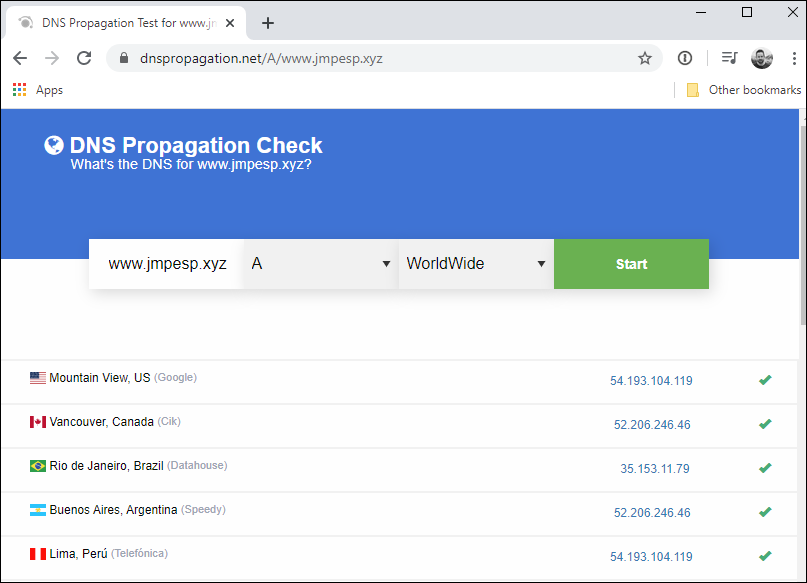
Remember, that we’ve configured equal weight distribution here but its totally possible to distribute the load somewhat by adjusting the weight distribution assigned to each record. Maybe we want the West coast servers to serve 80% of traffic, but we allow the East coast to serve up 20% of the time or something similar.
What about health checks? Route 53 excludes unhealthy records while there are healthy candidates. It isn’t silently changing their configured weights to zero.
If every record in the group is unhealthy, Route 53 treats them as healthy and selects using the routing policy and configured weights. So a weighted set keeps its weights; it doesn’t suddenly become an equal split. An active/passive failover pair has a different result when both targets are unhealthy: it returns the primary. The selection rules are worth reading before testing an outage.
Also, an 80/20 weighting means roughly that split of DNS answers, not a guaranteed split of HTTP requests. One busy recursive resolver can cache a single answer for a lot of users.
It is possible to get creative and combine failover and weighted in a chain. This might be a good approach for that backup S3 bucket “site down” page.
Geo-location records
Geo-location records allow us to route traffic based on where the request originated.
However, be careful. Without EDNS Client Subnet, this is estimated from the recursive resolver’s address. If the resolver sends a client subnet, Route 53 can use that instead. It still isn’t a GPS fix on the user. How Route 53 estimates location.
Also be careful that the most specific record is chosen, not necessarily the ‘closest’.
And, make sure that a ‘default’ location record is also specified if you want world wide access to the service.
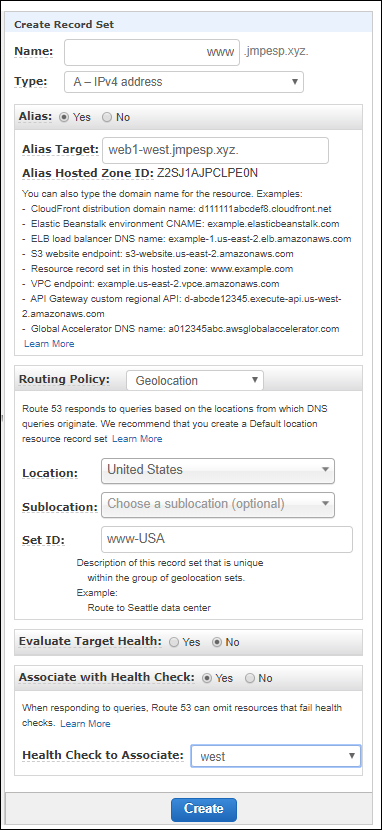
As an example - I might configure my web1-west server to serve all USA like this:
But for my heavy users in Seattle, I might choose a separate server: web2-west and use geolocation to override with a more specific record:
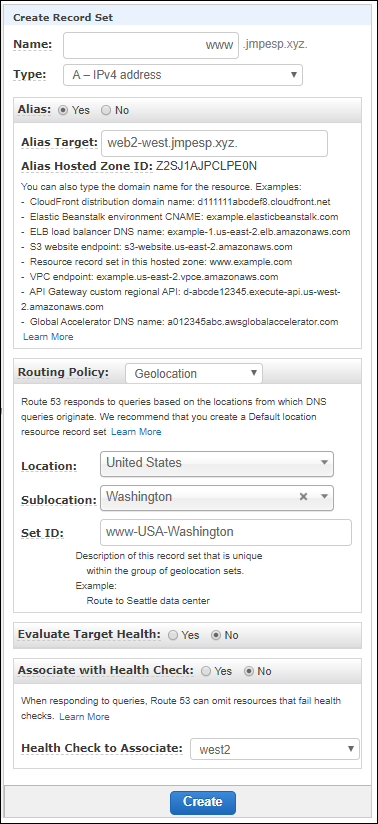
I’d then configure a catch all (or two) to return to clients that are neither Washington or broader USA.

Latency Records
We can route to the server with the lowest latency based on regions.
It is somewhat unpredictable with testing using dnspropogation.net site because latency will change minute by minute but this can be a good thing.
Traffic Flow Policies
Easy to configure.
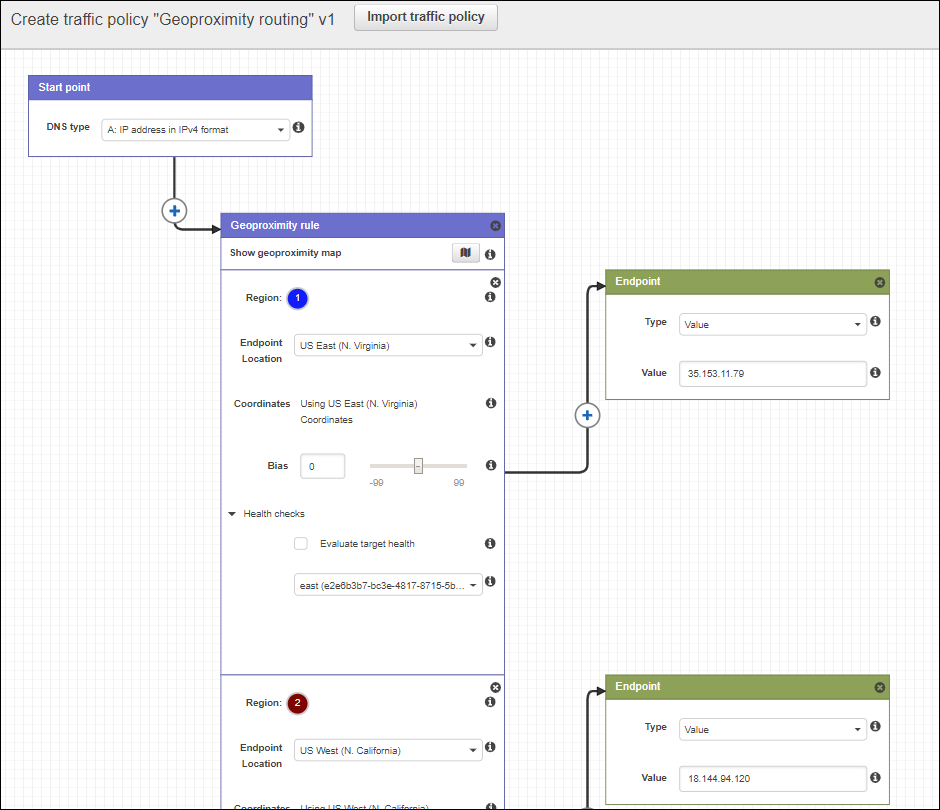
Two components: 1) traffic flow visual editor (drag and drop, generates policy) 2) Policy records
Policy records were expensive when I took these notes. Check current Route 53 pricing before using Traffic Flow in anger.
Here’s what the editor looks like (the thing that creates JSON for us):
Load Balancing with Multi-value answer records
The ability to send back more than one IP address is an answer.
Client can decide which to use.
If client can’t connect to the first, they might have the smarts to retry with the second.
We can assign health checks to multi-value records, which is useful because the route 53 service can pull records out that have failed their health checks.
The benefit of the this over a simple multivalued resource record is that the route 53 server is pulling out the down servers in responses. That is pretty good, but do remember that if all servers fail route 53 would go back to returning all records to the client.
Private Hosted Zones
Resolved through the VPC resolver for VPCs associated with the zone. On-premises clients can also reach those names through a configured Route 53 Resolver inbound endpoint.
Can support split brain DNS in this way, having an internal jmpesp.xyz for our VPC, then hosting the external jmpesp.xyz outside with completely different records.
To create, we choose “created hosted zone” as usual. But there is a type for “private hosted zone for amazon VPC”. In the settings we tell route 53 which VPC to assign the service to.
If you click “hosted zones” in the AWS console you’ll see either “private” or “public” for each zone.
We can also associate a private zone with additional VPCs. If you reopen the zone, the VPC section provides an “Associate new VPC” button.
Private hosted zones remove the need for hard-coded IP for the internal working of services inside private VPCs.
A gotcha with split DNS: if the private zone matches the name but doesn’t contain the requested record, Route 53 Resolver doesn’t fall back to the public zone. It returns a negative answer. If www.jmpesp.xyz should work from inside as well, put the appropriate record in the private zone too. Private hosted zone considerations.