azure
Infrastructure Notes - Azure Network Design Overview
Some notes on Azure networking: VNets, subnets, routes and the rules that decide whether two machines can talk. The interesting bit in this lab was how much communication worked before I’d configured any rules myself.
Start here: Azure Virtual Network overview
The screenshots are from 2020. One default has changed substantially since then: new VNets created with the API released after March 31, 2026 use private subnets by default. Existing VNets and older API versions can behave differently. Check the subnet’s outbound configuration when comparing these notes with a new deployment. Microsoft’s explanation.
Design questions to answer first
Before clicking around in the portal, write down a few things:
- What address ranges are available and guaranteed not to overlap with on-premises, partner, or future cloud networks?
- Which subnets represent trust boundaries, and which are just application tiers?
- Which services need private endpoints, service endpoints, or public access?
- Where should DNS resolution happen for Azure, on-premises, and private-link names?
- Is outbound Internet allowed directly, via NAT Gateway, through Azure Firewall, or through an NVA?
- How will flow logs, route tables, and NSG changes be monitored?
The address plan is especially annoying to fix after you’ve connected the VNet to somewhere else. Check for overlaps before creating the first subnet.
VNet
Primary networking technology, like the VPC in AWS.
Outbound Internet access worked by default in this lab. For a new private subnet, configure an explicit outbound path such as NAT Gateway or a firewall. An Internet route alone doesn’t provide source NAT.
Cloud services can go in to the VNET as well.
Can connect VNET’s to each other, or connect them to on premise.
Can bring own DNS, or use Azure DNS.
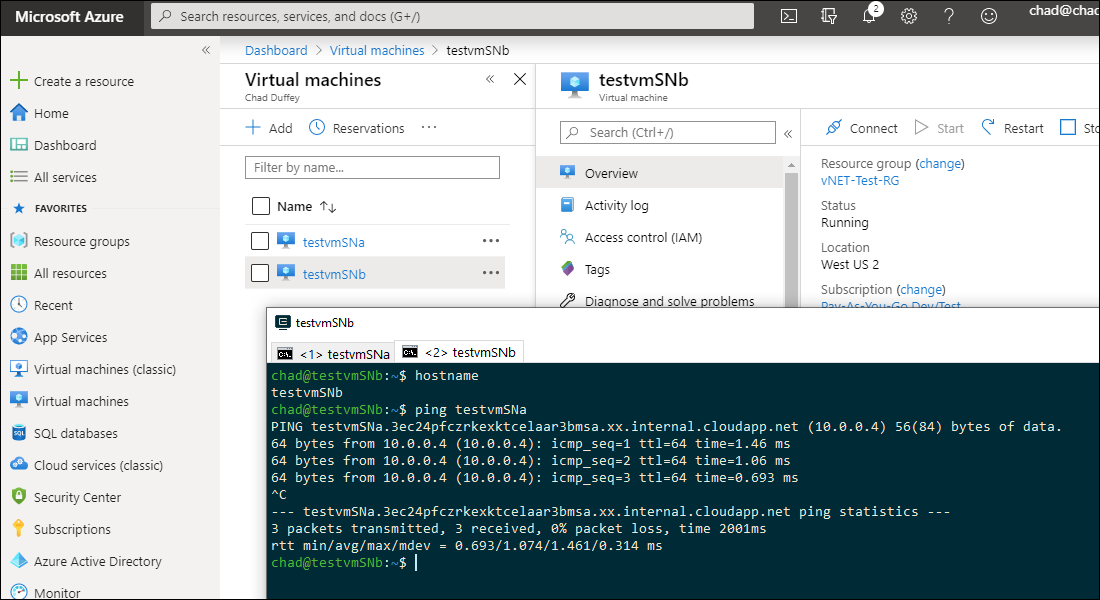
Subnets can communicate with each other by default. When I create subnet-a and subnet-b, then stick a vm in each, they will be able to freely communicate by default.
That default subnet-to-subnet reachability is the first thing to keep in mind for security design. A VNet is not automatically segmented just because you created multiple subnets. Use NSGs, route tables, Azure Firewall/NVAs, and application controls to define the communication you actually want.
Basics with PowerShell:
#Resource Group
$rg = "Test-NET-RG"

#Location
$location = "WestUS"

#VNET Name
$VNETName = "SL-VNET-PShell"

#Address Space
$VNETAddressSpace = "10.0.0.0/22"

#Subnets
$webSN = New-AzVirtualNetworkSubnetConfig -Name "Duff-Web" -AddressPrefix "10.0.0.0/24"
$appSN = New-AzVirtualNetworkSubnetConfig -Name "Duff-App" -AddressPrefix "10.0.1.0/24"
$dbSN  = New-AzVirtualNetworkSubnetConfig -Name "Duff-Data" -AddressPrefix "10.0.2.0/24"

#Create Resource Group
New-AzResourceGroup -Name $rg -Location $location

#Go ahead and create the VNET & Subnets
$virtualNetwork = New-AzVirtualNetwork -Name $VNETName -ResourceGroupName $rg `
    -Location $location -AddressPrefix $VNETAddressSpace -Subnet $webSN,$appSN,$dbSN

#-------------

#Add one more subnet separately
$subnetConfig = Add-AzVirtualNetworkSubnetConfig `
  -Name "ExtraSubnet" `
  -AddressPrefix "10.0.3.0/24" `
  -VirtualNetwork $virtualNetwork

#Write changes
$virtualNetwork | Set-AzVirtualNetwork
Routes in VNet
Local VNET - System route for addresses in the VNet.
On-Prem - Routes learned through the VPN/ExpressRoute gateway, or routes we configure for the design.
Internet - The default 0.0.0.0/0 system route has next-hop type Internet. Azure doesn’t have an Internet Gateway resource to attach like AWS does.
Then, we add user defined routes on top.
Route tables are also where designs start to get messy. If you force tunnel outbound traffic to a firewall or on-premises network, make sure you understand the impact on platform dependencies, package updates, identity endpoints, and any PaaS service that still needs egress. A route table that looks clean in a diagram can create painful asymmetric-routing or DNS problems later.
NSGs: Network Security Groups
Traffic filtering.
Can be associated with a subnet or a network interface card (but not the virtual machine itself; just the vNIC)
The direction of the flow dictates the ordering when traversing multiple NSG’s. For example, if there is a NSG on the subnet and a NSG on the vNIC, the vNIC rules will apply first outbound - if we block 80 on the vNIC it would never hit the NSG on the subnet.
In each NSG, lower rule numbers have priority. Custom rules use priorities from 100 to 4096, so a rule at 100 wins over one at 400. Processing stops at the first matching rule. NSG rule reference.
A flow record is created for existing connections. Communication is allowed or denied based on the connection state of the flow record. The flow record allows a network security group to be stateful
Existing connections might not be interrupted when you remove a security rule that enabled the flow. Traffic flows are interrupted when connections are stopped and no traffic is flowing in either direction, for at least a few minutes.
If a connection is unexpectedly blocked, check both the subnet and NIC rules. An allow in one NSG doesn’t override a deny in the other. Also test with a new connection after changing a rule; an existing connection can make it look as though the change did nothing.
Practical baseline
For a small production-ish deployment, a respectable starting point would be:
- A documented address plan with room for future subnets and peering.
- Separate subnets for ingress, application, data, private endpoints, and gateway/firewall resources where needed.
- NSGs that deny lateral movement by default between tiers, then allow specific required flows.
- A clear outbound pattern: NAT Gateway, Azure Firewall, or NVA rather than accidental public egress.
- Private endpoints for sensitive PaaS services where practical, with DNS tested from every relevant subnet.
- Flow logging and diagnostic settings enabled early, before troubleshooting forces the issue.
Diagram
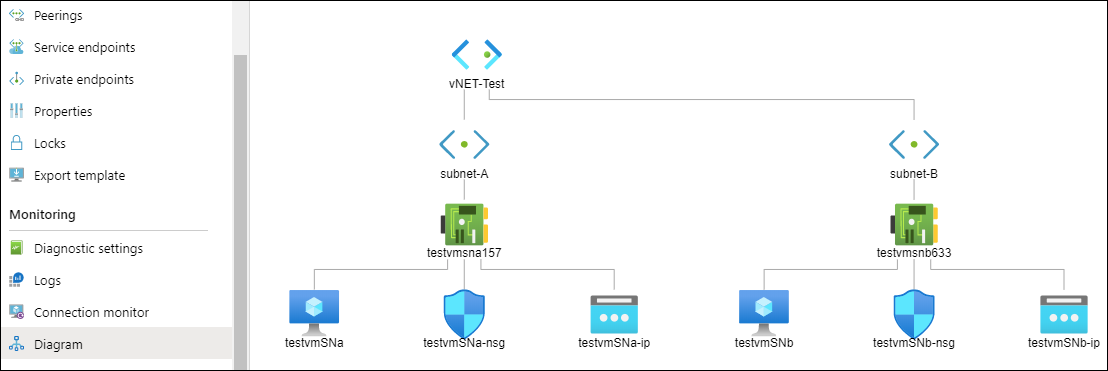
There’s a diagram function that makes your configuration easy to understand, and changes easier to follow. I deployed two subnets inside a /23 and a machine in each. The diagram below the output azure gives me and helps to figure out how all the pieces fit together - from vNIC to external IP and the NSG’s.