exploit
CVE-2020-0796 Mitigations
CVE-2020-0796 gave us two things to worry about: machines accepting SMB connections, and machines making them. These were the Group Policy changes for reducing exposure while the patch was being rolled out.
The bug was in SMB 3.1.1 compression handling. A vulnerable server could be attacked without authentication; a vulnerable client could be attacked by an SMB server it connected to.
- 3/12/20 fixed typo with rule direction in step 2 thanks to @TechGrlTweeter
- 3/12/20 Microsoft patched the issue. See the CVE-2020-0796 advisory for current details.
- Full Report
- Defender Signature
There are two problems:
- Windows Server versions 1903 and 1909 were affected. These are the Semi-Annual Channel releases, not Windows Server 2019 (build 17763).
- Windows 10 versions 1903 and 1909 were affected in both their SMB client and server roles.
Microsoft’s March 12, 2020 patch notes list the affected releases. The old standalone update has been superseded; use the applicable cumulative security update, not these workarounds as a substitute for patching.
Problem 1 - Servers
Use Group Policy to disable SMB compression on affected machines accepting SMB connections. This setting changes the server component only; it doesn’t protect the machine when it acts as an SMB client.
1) Create new Group Policy linked to Servers OU(s)
2) Apply WMI filter to the empty GPO:
root\CIMv2
Query: SELECT * FROM Win32_OperatingSystem WHERE (BuildNumber = "18362" OR BuildNumber = "18363") AND ProductType <> 1
That identifies the two server releases. It doesn’t check whether the patch is installed. The original >= 18300 filter shown in the screenshots was too broad, so use the corrected text here.
3) Edit the GPO:
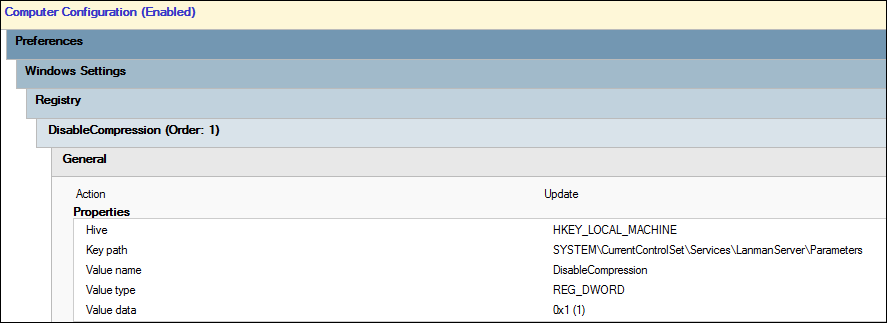
Computer Configuration > Preferences > Registry
Create new registry GPP item:
Action: Update
Hive: HKEY_LOCAL_MACHINE
Key Path: SYSTEM\CurrentControlSet\Services\LanmanServer\Parameters
Value Name: DisableCompression
Value Type: REG_DWORD
Value Data: 1
The value name has no space. The original text had Disable Compression, which creates a different registry value and won’t apply the workaround.
Screenshots (in case they are useful to you):
Original WMI query screenshot (thanks Tyler!); see the corrected scope above:

Full GPO:
Problem 2 - Clients
Goal: Prevent your clients from being tricked into talking to a malicious SMB server while retaining access to corporate SMB services.
1) Create a new GPO linked to Workstations OU(s)
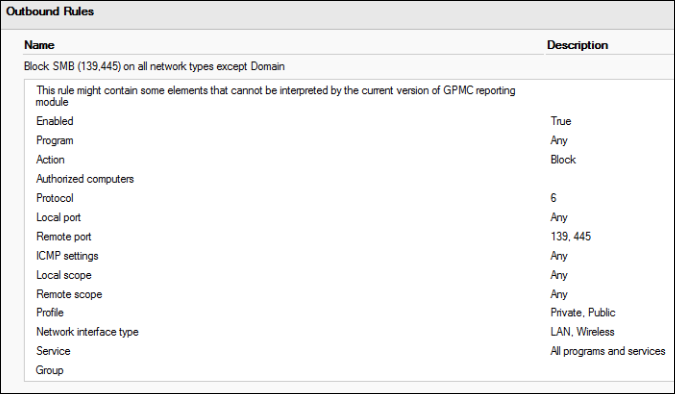
2) Navigate to Computer Configuration > Windows Settings > Security Settings > Windows Defender Firewall with Advanced Security > Outbound Rules
3) New Outbound Rule:
Rule Type: Port
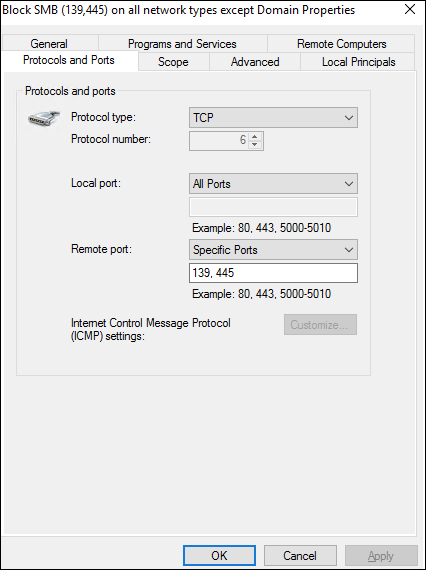
Protocols and Ports: TCP, Specific Ports: 139,445
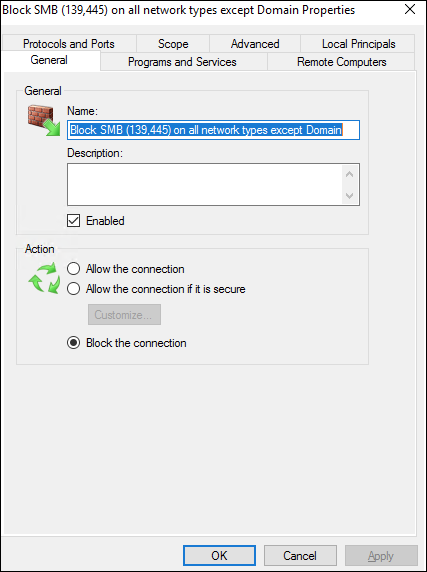
Action: Block the connection
Profile: Private, Public (Not Domain)
Name: DENY TCP 139,445 OUTBOUND when off Domain Network
Done.
Our L2TP connection needed an exception for corporate logging. This next step excludes all Remote Access interfaces from this rule, so it only makes sense if those interfaces lead to trusted corporate services:
4) Open the Outbound Rule you just created. Navigate to the “Advanced” tab. On Interface Types click Customize. Un-check the “Remote Access” interface type.
Also, excluding the Domain profile doesn’t mean “allow only corporate SMB servers”. It means this block rule is inactive on that profile. The rule reduces exposure off the domain network; it isn’t a destination allowlist.
Note: It is recommended to have SMB (TCP 139,445) blocked inbound to workstations as a security baseline. Highly recommended if you can make it work with your business. The workstations still act as SMB ‘servers’ in the context of this vulnerability. If you can’t, you’ll need to apply the server rules to the workstations as well.
Screenshots (in case they are useful to you):
General tab of FW rule:
Ports and Protocols:
Allow Domain Network SMB:
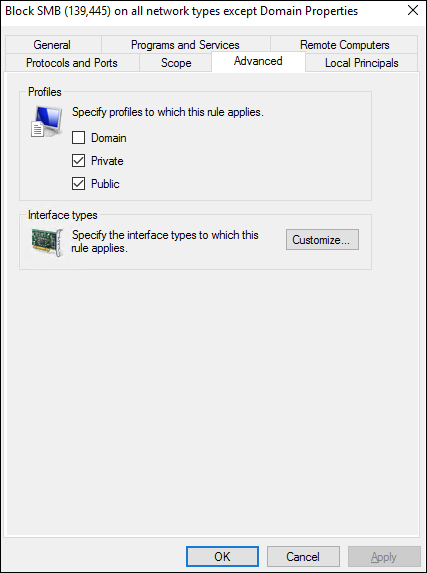
Allow L2TP connection SMB (inside advanced tab):
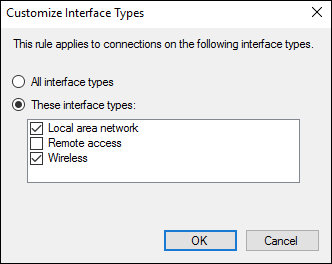
Full rule: