web
X-Forwarded-For header
Put a reverse proxy in front of a web server and the server usually sees the proxy’s IP as the connection source. X-Forwarded-For (XFF) is how the proxy can pass along the client address. Handy for logging, but there’s a catch: a client can send that header too.
The standardized equivalent is the HTTP Forwarded header. X-Forwarded-Host and X-Forwarded-Proto carry different information: the original host and protocol, not the client IP.
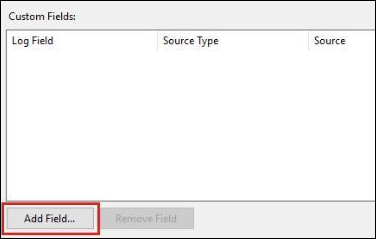
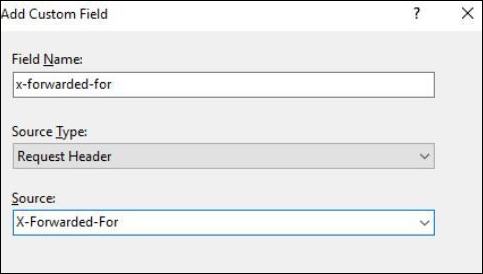
When building infrastructure for customer environments, it might be important to capture the X-Forwarded-For header if there is an expectation that you would be able to provide real source IP information to the detection team. This is especially true behind load balancers. This post shows how to configure logging for Apache on various distributions. For Microsoft IIS it is a little more clicky clicky: this one post good. It is in the logging > “select fields” section and we are adding a custom field:
Why the sudden interest?
There was a Hack The Box machine that required modifying this header to reach an administrative console. It’s called Control. I’ll also freely admit that I hadn’t finished this one when I wrote the note - it’s hard! But I wanted to jot down some notes about XFF since it comes up at work a lot.
We started out in the usual way: nmap -sC -sV 10.10.10.167
And identified:
root@kali:~# nmap -sC -sV 10.10.10.167
Starting Nmap 7.80 ( https://nmap.org ) at 2020-04-25 14:48 EDT
Nmap scan report for 10.10.10.167
Host is up (0.10s latency).
Not shown: 997 filtered ports
PORT     STATE SERVICE VERSION
80/tcp   open  http    Microsoft IIS httpd 10.0
| http-methods:
|_  Potentially risky methods: TRACE
|_http-server-header: Microsoft-IIS/10.0
|_http-title: Fidelity
135/tcp  open  msrpc   Microsoft Windows RPC
3306/tcp open  mysql?
Service Info: OS: Windows; CPE: cpe:/o:microsoft:windows

Service detection performed. Please report any incorrect results at https://nmap.org/submit/ .
Nmap done: 1 IP address (1 host up) scanned in 34.41 seconds
(I suppose) MySQL is interesting on a Windows box, but attempting to connect with mysql -h 10.10.10.167 didn’t allow any access right away.
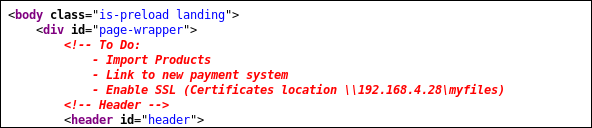
The web page on port 80 seemed somewhat interesting, and had login/logout (although they didn’t appear to work right away); this note in the source (ctrl+u) seemed valuable though:
Some more recon on the website with gobuster: gobuster dir -u http://10.10.10.167 -x php -w /usr/share/wordlists/dirbuster/directory-list-2.3-medium.txt revealed an admin page (among other things):
===============================================================
Gobuster v3.0.1
by OJ Reeves (@TheColonial) & Christian Mehlmauer (@_FireFart_)
===============================================================
[+] Url:            http://10.10.10.167
[+] Threads:        10
[+] Wordlist:       /usr/share/wordlists/dirbuster/directory-list-2.3-medium.txt
[+] Status codes:   200,204,301,302,307,401,403
[+] User Agent:     gobuster/3.0.1
[+] Extensions:     php
[+] Timeout:        10s
===============================================================
2020/04/25 14:59:36 Starting gobuster
===============================================================
/index.php (Status: 200)
/images (Status: 301)
/about.php (Status: 200)
/uploads (Status: 301)
/Images (Status: 301)
/admin.php (Status: 200)
/assets (Status: 301)
/About.php (Status: 200)
/Index.php (Status: 200)
/database.php (Status: 200)
Unfortunately, the admin page responded with:
Access Denied: Header Missing. Please ensure you go through the proxy to access this page
And, that’s where I was stumped for a bit. (Circling around the other potential website approaches and the ports from the original scan).
Eventually after considering that another proxy was probably out of scope of this HTB scenario and the message seemed to be a clue I considered trying to mess with it.
The other clue we have is the 192.168.4.28 machine referenced in the HTML source above.
I checked if that was the magic ticket with burp:
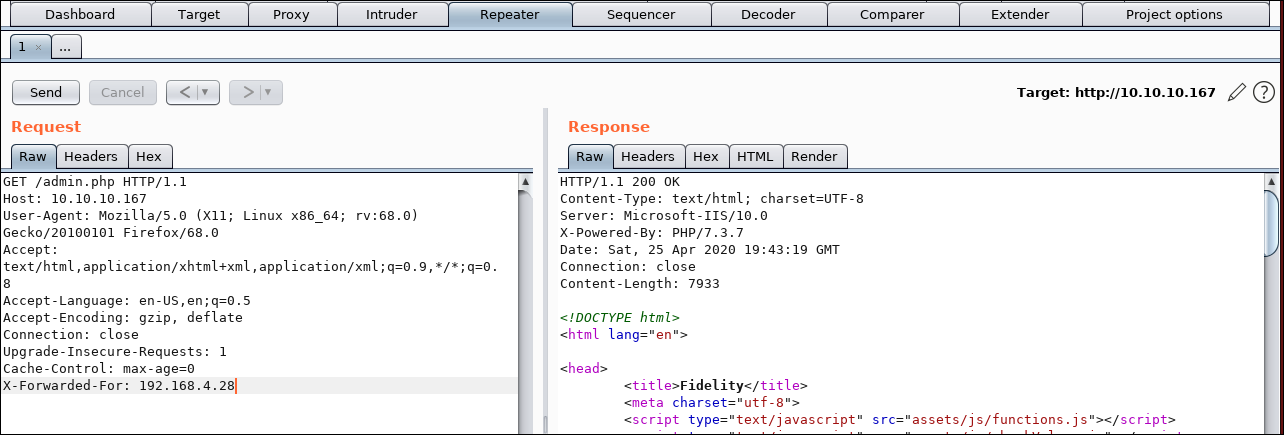
That looks good.
Also worth mentioning that it seemed likely that 192.168.4.28 would not be the actual IP, but just a clue to the subnet. I had planned to use Intruder and iterate through the last octet:
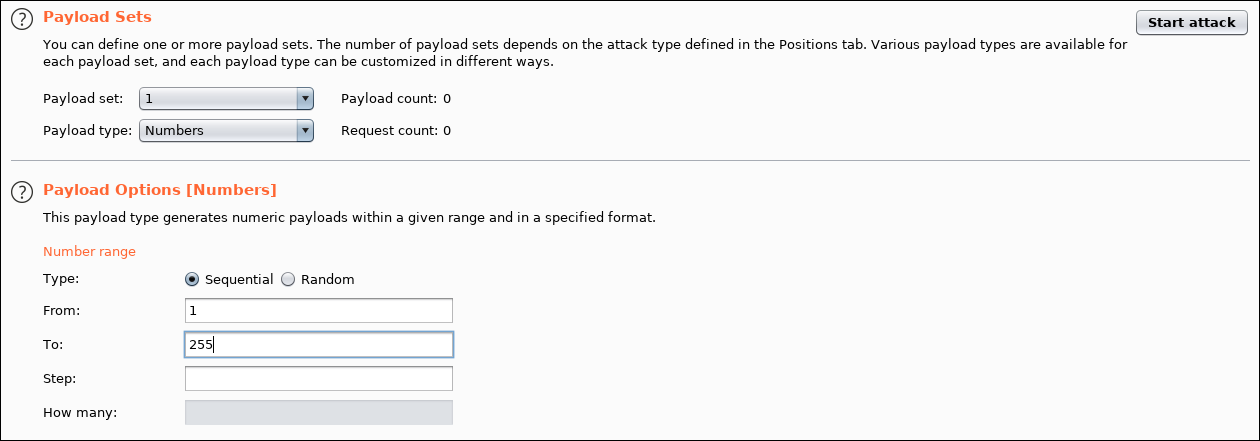
Then sort the output by size. You can see that there is a request (number 28) that appears to be much larger than the others. On closer inspection of the response, it appears we are logged in.
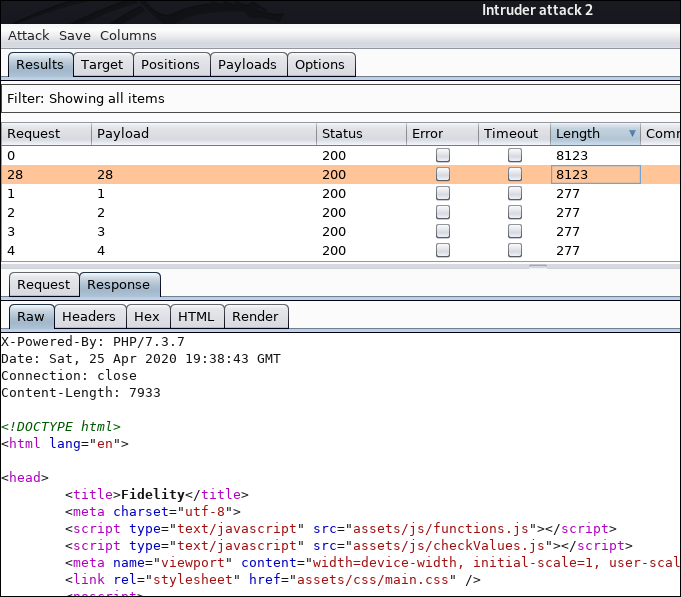
Anyway, it looks like the application trusts 192.168.4.28 in X-Forwarded-For. That doesn’t prove there’s a proxy at that address; it proves the header value is enough to satisfy this check.
Last thing to do, it to confirm it works using burp’s intercept function to change the request from the browser.
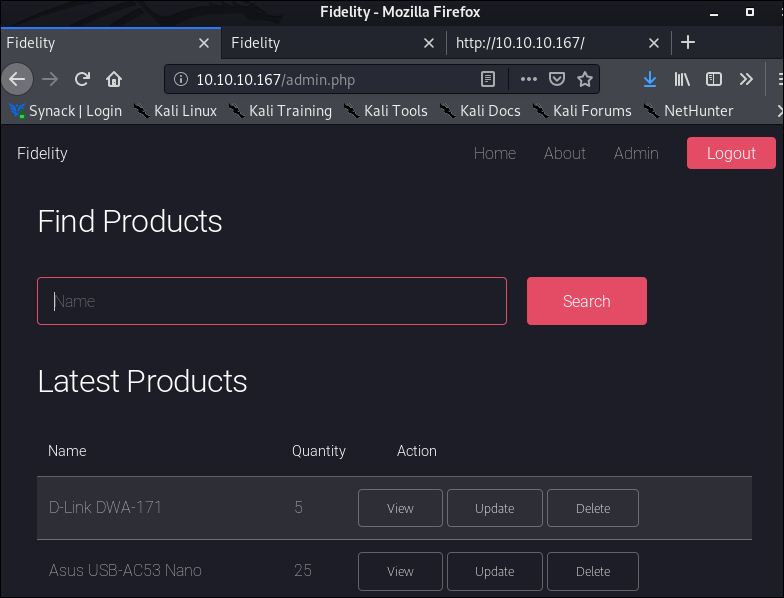
Done! We’re in the admin console. Modifying the X-Forwarded-For header in our HTTP request to appear as though we came through the proxy did the trick.
Anyway, I thought that was cool, and crossed over with work we do on the defensive side to make sure we log these things for our deployments. So, this post is going to be my little repo of X-Forwarded-For notes :)
(I’ll also keep working on this pretty dang hard machine)
Back on the defensive side
The application needs to know which proxies it trusts. For example, if the incoming TCP connection is from our load balancer, it can process that load balancer’s forwarded headers. If the connection came straight from the Internet, the same header is just something the client typed.
With several proxies, don’t blindly take the leftmost address. Work back through the chain from the trusted connection peer and stop when trust ends. Apache’s mod_remoteip documents this right-to-left behavior and lets us configure trusted proxy addresses.
For detection, keep the actual connection peer as well as the interpreted client address. Otherwise a configuration mistake can replace the useful evidence with an attacker-supplied value. And block direct access to the backend when the design depends on every request passing through the proxy.