windows · windbg · security
Following an access token with WinDbg: what Windows sees when you ask for access
Same user, same file, one process gets access and the other doesn’t. Before changing the ACL again, it’s worth looking at the other half of the check: the caller’s token.
Which groups are enabled? Which privileges are present? Is the thread impersonating someone? “I’m an admin” leaves quite a few of those questions unanswered.
Let’s follow an access token from whoami into WinDbg, first in user mode and then through the kernel’s process object. There are a few useful surprises in an object that’s easy to think of as just a username.
What a token actually is
Microsoft documents an access token as an object that describes the security context of a process or thread. That phrasing is useful because it prevents two common mistakes.
The first mistake is treating the token as just an identity card. It does contain identity material, including the user SID and group SIDs, but it also carries privileges, a logon SID, an owner SID, the default DACL Windows can use when a thread creates a securable object without supplying a security descriptor, optional restricting SIDs, and information about whether the token is primary or impersonation.
The second mistake is treating the token as the whole authorization decision. It is not. The token is the caller side of the picture. The target object’s security descriptor, any mandatory integrity label, and object-specific checks still matter. But the token is one of the main inputs Windows uses to decide what this caller can plausibly do.
That makes it a great debugging object. If you want to understand why the same user can get different answers from two processes, or why a thread inside a server process can behave differently from the process default, the token is one of the first places worth looking.
What lives in a token
Microsoft’s Access tokens documentation lists the main ingredients:
- the SID for the user account
- SIDs for the groups the user belongs to
- a logon SID for the current logon session
- the privileges held by the user or the user’s groups
- an owner SID
- a primary group SID
- the default DACL the system can use when a thread creates a securable object without supplying a security descriptor
- token source and statistics
- whether the token is primary or impersonation
- optional restricting SIDs
- impersonation-level information
For example, if Windows is deciding whether to grant access to a file, registry key, process, section, or token object, the SIDs in the caller’s token matter because access control entries are matched against those SIDs. The SID attributes matter too: an enabled SID can match allow and deny ACEs, while a deny-only SID is used for deny checks but ignored for allow checks. If the system is deciding whether a caller can perform a privileged system operation, the privilege list in the token matters. If the question involves integrity, the integrity SID stored in the token matters there too, but in a separate mandatory access control step.
So even before we open WinDbg, the token gives us a better way to frame the question:
What security context is this process or thread actually presenting to the system right now?
Lab 1: see the token from user mode first
Before dropping into the debugger, it helps to look at the same security context through ordinary tools.
From a PowerShell prompt:
whoami /user
whoami /groups
whoami /priv
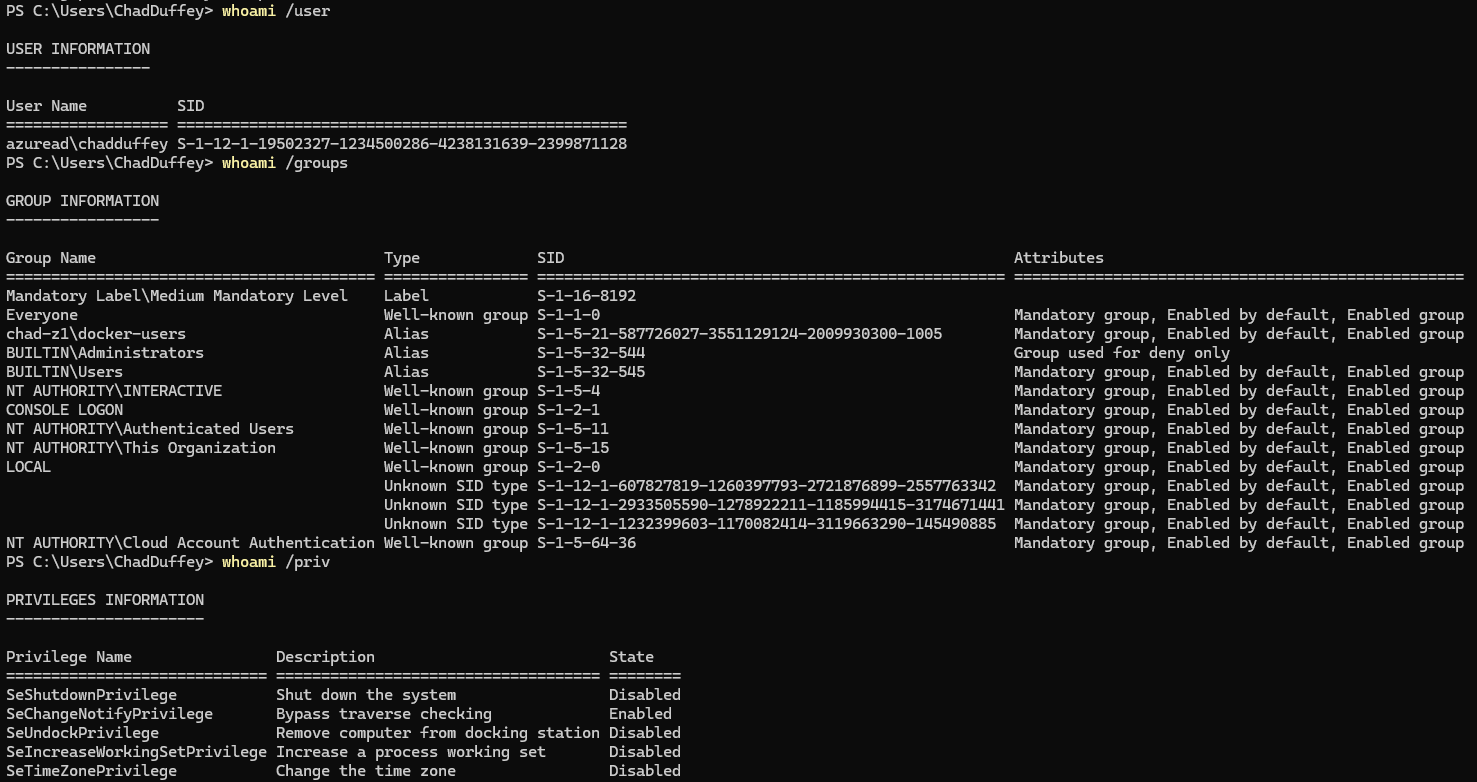
This is not a raw token dump, but it is a very useful first approximation.
whoami /user shows the user SID associated with your current logon context.
whoami /groups shows group SIDs and labels, including integrity labels such as Medium Mandatory Level or High Mandatory Level, depending on how the process was launched.
As a tiny preview, those labels are part of Windows Mandatory Integrity Control. A normal unelevated desktop process usually runs at Medium Mandatory Level. An elevated administrator process typically runs at High Mandatory Level. That does not mean “high can do anything,” but it does mean Windows is tracking more than just your user and group SIDs when it makes access decisions.
whoami /priv shows the privilege side of the token. Microsoft is explicit in its Privileges documentation that privileges are not the same thing as access rights. Privileges govern system-related operations. Access rights govern access to securable objects.
That distinction matters immediately. The output of whoami /priv might show SeDebugPrivilege, but that does not mean a handle request against some target object will automatically succeed. It means the token contains that privilege, with a state such as enabled or disabled, and Windows may consult it in code paths where that privilege matters.
Same account, two different tokens
For a quick comparison, sign in as an administrator with UAC enabled. Run those three whoami commands in a normal PowerShell window, then again in one opened with Run as administrator for the same account.
The user SID should match. Now look at BUILTIN\Administrators: in the filtered token it is normally deny-only, so it can’t satisfy an allow ACE. The integrity label and privilege list change too. Microsoft’s UAC description covers the pair of tokens behind this behaviour.
If the elevation prompt asked for a different administrator’s credentials, you’ve changed accounts as well as elevation. Check the user SID before drawing conclusions from that comparison.
Lab 2: look at the token in live user-mode WinDbg
The nice thing about this topic is that WinDbg can join the story early. We do not need to begin in kernel mode.
Microsoft documents the !token extension as available in both kernel mode and live user-mode debugging. It is not available for user-mode dump files. In live user mode, if you omit the handle or pass 0, WinDbg displays the token associated with the target thread.
Start a simple target process such as Notepad or PowerShell, then attach to it with WinDbg.
Once you break in, try:
!token -n 0
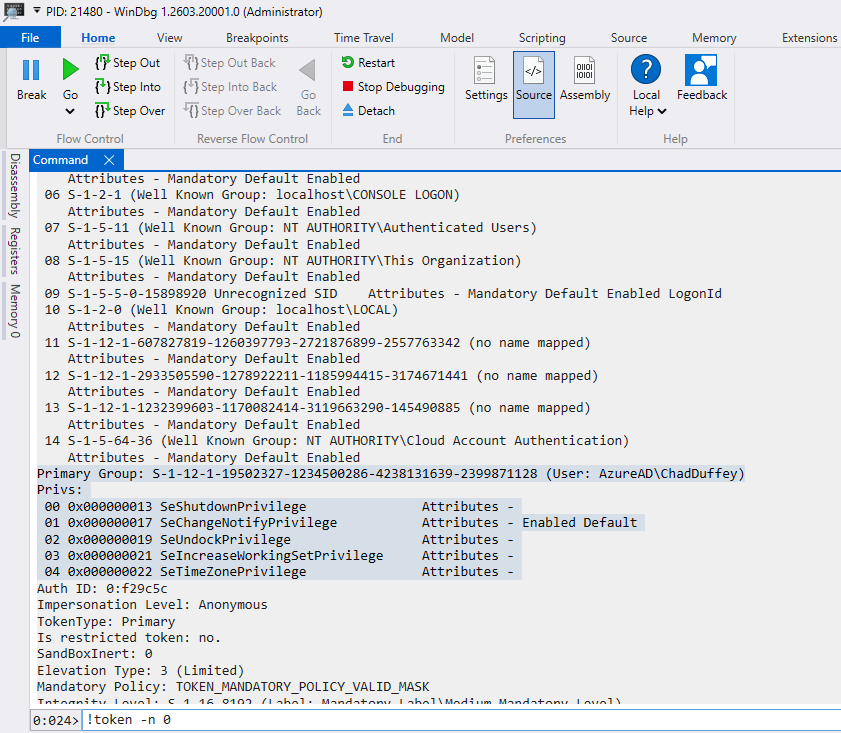
In practice, this is handy when a process should be able to touch something but still gets denied. Instead of guessing, you can inspect the token directly and confirm what security context Windows is really evaluating.
The selected thread matters here. If you’re debugging an impersonating server, inspect the thread doing the work, not whichever thread happened to break into the debugger. Also, !token takes a handle in user mode and an address in kernel mode. Don’t carry a number from one example into the other and expect it to mean the same thing.
Lab 3: follow the token from EPROCESS
For the next step, I am switching to a kernel debugger attached to a lab VM. Kernel debugging setup is much easier to recover from in a lab than on bare metal.
If you want the quick VMware Workstation version:
- In the guest, open an elevated PowerShell or Command Prompt and enable serial kernel debugging:
bcdedit /debug on
bcdedit /dbgsettings serial debugport:1 baudrate:115200
- In VMware Workstation, add a serial port:
Add->Serial Port- choose
Output to named pipe - set a pipe name such as
\\.\pipe\kd_Win11 - set
This end is the server - set
The other end is an application - tick
Connect at power onif available
Reboot the guest after changing its boot debugging settings. Keep the BitLocker recovery key available if the lab guest uses BitLocker; boot-configuration changes can trigger recovery.
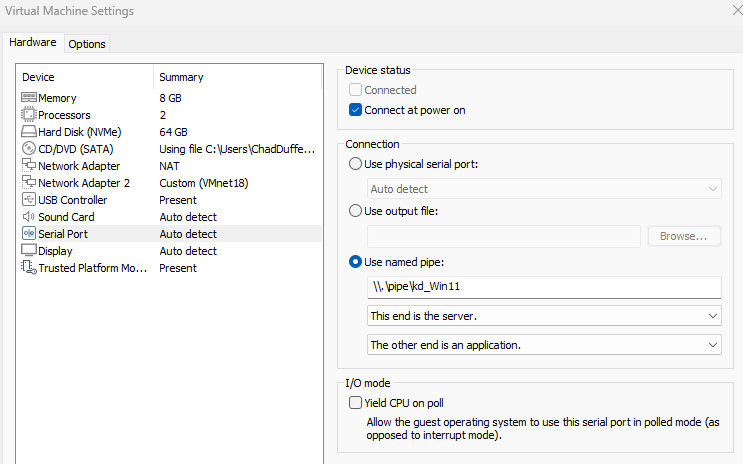
The pipe name can be anything. I usually make it descriptive, such as kd_Win11 or kd_lab.
Microsoft’s virtual-machine kernel-debugging docs use this same COM-over-named-pipe approach. They also note that when the debugger is running on the same host as the VM, WinDbg should connect to \\.\pipe\PipeName.
On the host, start WinDbg as Administrator. Then attach through the WinDbg UI with File -> Kernel Debug -> COM, and point it at the same pipe name.
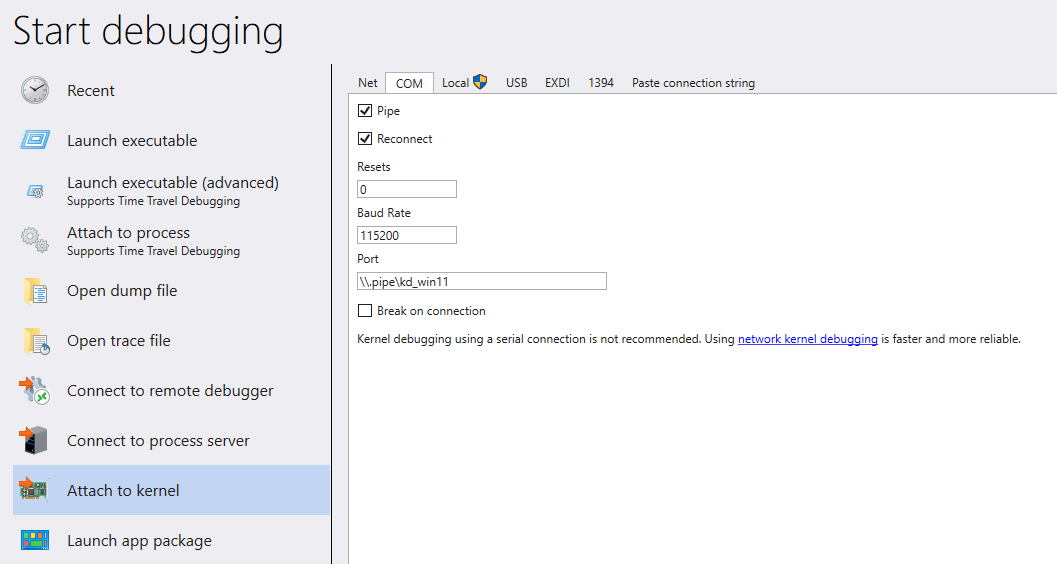
If you prefer the command line, the same VMware connection can be started with:
windbg.exe -k com:pipe,port=\\.\pipe\kd_Win11
Microsoft’s general virtual-machine COM examples include resets=0 and reconnect, but the parameter notes specifically say not to use those options for VMware because VMware preserves the pipe across restarts.
Microsoft’s VM debugging docs recommend KDNET, and the KDNET docs describe network debugging as faster than serial. The catch is adapter support: the host can use any NIC, but the target must use a supported network adapter. In a VMware guest, a serial pipe is often the path of least resistance because it avoids having to care whether the chosen virtual NIC is one KDNET likes.
In a kernel debugging session, use !process to locate a target process. A calm target such as notepad.exe is a good starting point because we are not trying to prove anything exotic yet.
!process 0 1 notepad.exe
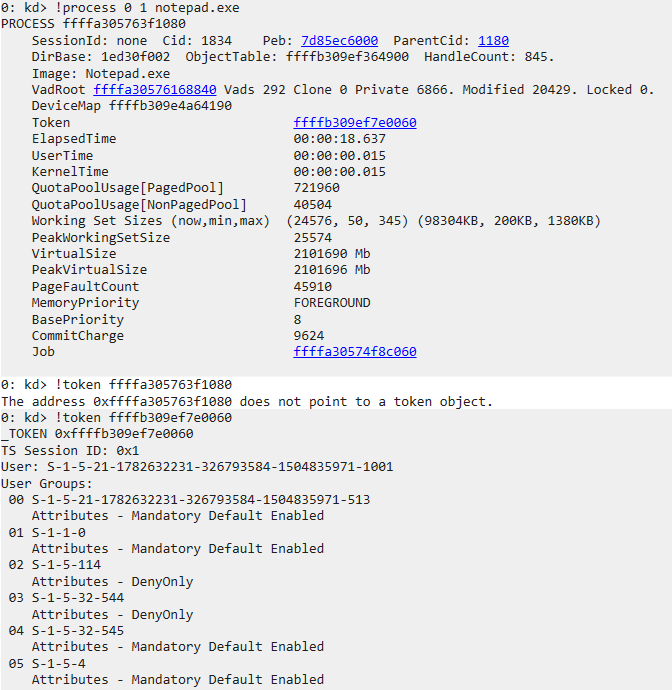
The important detail in the screenshot is that the address we want next is not the process address itself. It is the address of the token object, which !process shows in the process output after you target notepad.exe.
One debugger wrinkle: if you inspect the raw _EPROCESS.Token field yourself with dt, that field is not always presented as a plain pointer. On current Windows it is an _EX_FAST_REF, which uses low bits for reference-count state. The !process output is the easier path here because it gives you the token address in the form !token expects.
Microsoft’s !process documentation shows that the debugger can display the EPROCESS block for a process, including a token pointer. That is the bridge we want.
Once you have the token address, feed it into !token:
!token <TokenAddress>
Then, if you want to go one layer deeper:
dt nt!_TOKEN <TokenAddress>
This is the process’s primary token. It won’t tell you whether a particular thread is currently impersonating; we’ll come back to that below. Use symbols for _TOKEN rather than copying offsets from another Windows build.
!processtells you where the token lives.!tokentells you what security context it carries.
Primary token versus impersonation token
One of the most important distinctions in this area is the difference between a primary token and an impersonation token.
Every process has a primary token. If a thread is not impersonating, that primary token is the security context Windows uses for access checks involving that thread.
A thread can also carry an impersonation token. Microsoft’s Access tokens and Windows security model documentation describe this as the mechanism that lets a server thread act in the security context of a client.
That matters because “what token does this process have?” is not always the full answer. Sometimes the more precise question is “what token is this thread using right now?”
For a lot of desktop troubleshooting, the process primary token is enough to explain what you are seeing. But in service code, RPC paths, named-pipe servers, web back ends, and other code that can act on behalf of another caller, the thread’s impersonation token may be the thing Windows actually uses for the access check.
The practical takeaway is that the process token tells you the default security context, but the thread token may explain the access check you are actually debugging. If a server-side component is acting on behalf of a caller, check whether the thread is impersonating before you assume the process token tells the whole story.
Privileges are not access rights
This distinction is worth keeping separate, because Windows discussions blur it constantly.
Microsoft’s documentation defines a privilege as the right to perform a system-related operation on the local computer, such as loading a driver or changing the system time. It separately defines access rights as rights checked against a securable object’s security descriptor.
That gives us a cleaner way to talk about common APIs:
OpenProcessTokenopens the primary token of a process- the process handle passed to
OpenProcessTokenmust havePROCESS_QUERY_LIMITED_INFORMATION - the requested token access is checked against the token object’s DACL
GetTokenInformationrequiresTOKEN_QUERYfor token information classes other thanTokenSource, which requiresTOKEN_QUERY_SOURCE
In other words, even when we are “just querying the token,” there are multiple access checks in play:
- can we open or already hold a process handle with the required process rights?
- can we open the token with the desired token rights?
- do we then ask for token information that our granted token handle actually permits?
On an ordinary system, an elevated administrator can often inspect the tokens of many normal processes. But that is not something to assume universally. The process-handle check still matters, the token object has its own access control, and newer boundaries such as protected processes can still change the outcome.
That is a better model than “admin can just read the token.”
Disabled isn’t the same as missing
One API detail worth knowing: AdjustTokenPrivileges can enable a privilege already in the token. It cannot add one that isn’t there.
There’s a slightly mean return-value trap too. The function can return nonzero while GetLastError() reports ERROR_NOT_ALL_ASSIGNED. In that case, at least one requested privilege wasn’t in the token; checking only the Boolean return can leave a tool claiming it enabled a privilege it never had. Check both, immediately after the call.
Integrity is in the token, but it is not the whole story either
The token does not just carry identity and privileges. It also carries integrity information, and that matters during access checks.
Microsoft’s Mandatory Integrity Control documentation explains that the integrity SID for a security principal is stored in its access token. Securable objects can also carry an integrity label, stored in the object’s SACL as a mandatory label ACE.
The practical effect is straightforward: Windows evaluates Mandatory Integrity Control before it evaluates the ordinary allow-or-deny question in the DACL. By default, objects are created with a mandatory label policy of “no write up.” A low-integrity process cannot write to a medium-integrity object even if the DACL would otherwise allow it. Objects without an integrity label are treated as medium integrity by the operating system. Tokens also have a mandatory policy, which can be queried with GetTokenInformation using TokenMandatoryPolicy.
That is why integrity labels in whoami /groups are worth noticing. They are not decorative. They are part of the security context Windows may use when deciding whether this process gets to modify something.
Why attackers care about tokens
Access tokens obviously aren’t just a debugging convenience—they’re fundamental to authorization. Windows uses them as part of its access check to determine whether a caller is allowed the requested operation.
Microsoft’s access-check documentation explains that the system compares the requested access against the security descriptor for the target object, using the caller’s access token as the subject context. It also calls out the impersonation case: if the thread is impersonating another user, the system uses the thread’s impersonation token.
That is the concrete reason attackers care. The token is not just a label attached to a process. It is caller-side state that can influence many later decisions: which SIDs are considered, which privileges are present and enabled, which integrity level applies, and whether the thread is acting as itself or impersonating someone else.
In the normal user-mode path, Windows puts gates in front of that state. Opening a process token requires an appropriate process handle. Opening a token with the desired token access rights is checked against the token object’s DACL. Enabling a privilege requires the privilege to already exist in the token. Impersonation has its own rules and handle requirements. Those checks are the point.
Kernel compromise changes the problem. Microsoft’s vulnerable driver blocklist documentation describes drivers that attackers can exploit to elevate privileges in the Windows kernel or circumvent the Windows security model. If a vulnerable driver gives an attacker arbitrary kernel read/write, the attacker may not need to succeed through OpenProcessToken, OpenThreadToken, or AdjustTokenPrivileges at all. They may be able to tamper with the underlying process or thread security state directly.
Conceptually, token abuse usually comes down to changing what security context future checks will see. That might mean making a process or thread present a more privileged token, or changing token-related state so later checks see different SIDs, privileges, or integrity information than they should. The exact mechanics are build-dependent, unsupported, and easy to get wrong; the important point for this post is the model.
From a WinDbg point of view, the earlier !process and !token work is not just trivia. It shows the relationship a defender or attacker would both care about: the process has a primary token, a thread may have an impersonation token, and !token lets you inspect the security context Windows is going to reason over.
That gives us a useful defensive habit. If a process has access that does not make sense, do not stop at the process name or executable path. Look at the token. Look for the user SID, enabled groups, deny-only groups, enabled privileges, integrity level, and impersonation state. A strange token does not automatically prove compromise, but it is one of the places where the real explanation may be hiding.
Next time two processes disagree about access, compare their tokens before “fixing” the target’s permissions. If the process tokens match, check the thread. That gets you much further than another round of adding Full Control.
Sources worth keeping open
- Microsoft Learn: Access tokens
- Microsoft Learn: Impersonation Tokens
- Microsoft Learn: SID Attributes in an Access Token
- Microsoft Learn: OpenProcessToken
- Microsoft Learn: GetTokenInformation
- Microsoft Learn: Access Rights for Access-Token Objects
- Microsoft Learn: Privileges
- Microsoft Learn: How AccessCheck Works
- Microsoft Learn: Mandatory Integrity Control
- Microsoft Learn:
!token - Microsoft Learn:
!process - Microsoft Learn: Setting Up Kernel-Mode Debugging of a Virtual Machine Manually Using a Virtual COM Port
- Microsoft Learn: Set Up KDNET Network Kernel Debugging Manually
- Microsoft Learn: Windows security model for driver developers
- Microsoft Learn: Microsoft recommended driver block rules