windows · security
When do Windows file permissions take effect?
You remove someone’s write permission from a file. The permissions dialog gives you a hearty thumbs up. Their next attempt to open the file for writing fails. BUT the program that already had the file open writes another line successfully - what gives?
The program is using a handle it opened before the permissions changed.
That handle keeps the write access Windows granted it. Raymond Chen explained this in The security check happens at the acquisition of the handle.
So… let’s play around with it: change a file’s discretionary access control list (DACL), then compare the handle we already have with a new open.
Get set up
You’ll need:
- A Windows 11 lab VM.
- PowerShell 5.1 or later.
- Procmon, which the setup script downloads for you.
Download and extract the lab ZIP on the VM. Open PowerShell in the extracted folder, not as administrator, and run:
.\Setup-Lab.ps1
The setup script displays Procmon’s location on the line starting Procmon:. Open that folder, right-click the Procmon executable, and choose Run as administrator.
Back in PowerShell, run:
.\Invoke-HandleLab.ps1 -Experiment 1 -Pause
The script prints its process ID (PID) and run folder, then pauses. Filter Procmon to that PID and folder. Leave the terminal paused while you read; when you reach experiment 1, start capture and press Enter.
PowerShell’s Add-Type compiles the included C# code, so you don’t need a C++ compiler for experiments 1-6. The C++ and WinDbg sections are optional. The README covers setup options and troubleshooting.
This follows the posts on process creation, protected processes, and access tokens. The token describes the caller’s security context. The handle records the access that caller obtained.
Opening a file versus using it
Opening a file for writing and writing through an existing handle are different operations. ReadFile and WriteFile use a handle the program already has. After a permissions change, Windows can deny a new open for writing while still allowing writes through an existing writable handle.
Having the required rights doesn’t guarantee that a read or write will succeed. Locks, storage errors, and other I/O checks still apply.
For the first six experiments, we’ll leave the token and file identity alone and change the DACL or how the file is opened. In the last experiment, we’ll change the thread’s token instead.
How do we get from a path to an open file object?
Start with an ordinary synchronous open:
HANDLE file = CreateFileW(
    path,
    GENERIC_READ | GENERIC_WRITE,
    FILE_SHARE_READ | FILE_SHARE_WRITE | FILE_SHARE_DELETE,
    nullptr,
    OPEN_EXISTING,
    FILE_ATTRIBUTE_NORMAL,
    nullptr);

if (file == INVALID_HANDLE_VALUE) {
    const DWORD error = GetLastError();
    // Report error before another API call can replace it.
}
Despite its name, CreateFileW also opens existing files. We use OPEN_EXISTING; CREATE_ALWAYS would truncate an existing file - yikes. The path identifies the file, requested access says what we want to do, and share mode says which other opens we’ll allow while this handle is open.
Windows resolves the path and sends an open request through the I/O and filesystem stack. The Object Manager and I/O Manager take part, but the filesystem checks access to its files.
In driver terminology, this is an IRP_MJ_CREATE request, even when we’re opening an existing file. It carries the caller’s security context and requested access. The parameters to SeAccessCheck show what goes into an access decision: the security descriptor, caller’s context, requested rights, and mapping of generic rights.
Here’s how opening the file and using the handle fit together:
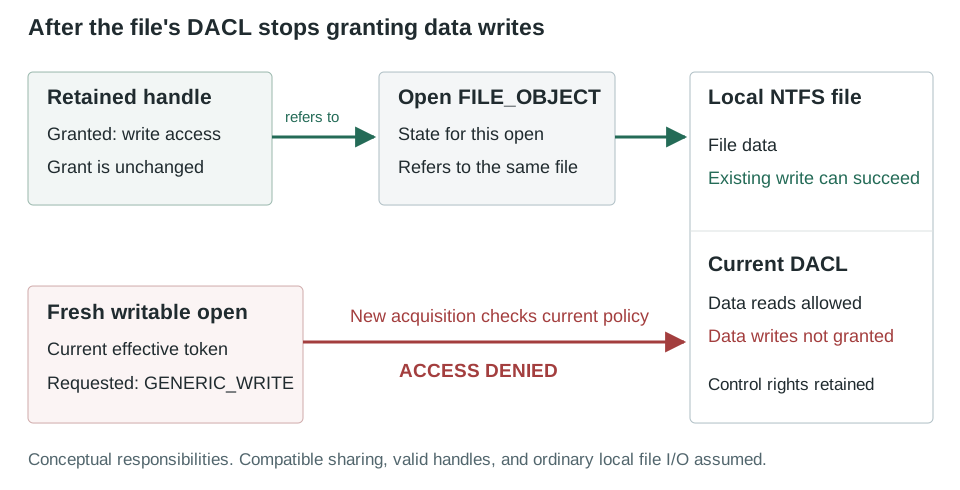
A file handle refers to a kernel object through the owning process’s handle table. It isn’t a filename or a pointer to the data.
For these file opens, that kernel object is a file object, represented by the FILE_OBJECT structure. Think of it as Windows’ record of one particular open: it tracks the file position and access and sharing state. Two independent opens can have separate file objects for the same NTFS file.
Its ReadAccess, WriteAccess, and DeleteAccess fields track sharing state, not the full rights granted to each handle. Experiment 4 shows the difference.
Two access checks, with different meanings
At open: can the caller obtain the requested access? Windows checks the file’s DACL against the caller’s effective token: normally the process token, or the thread’s token when impersonating. The DACL lists access control entries (ACEs) for users and groups, identified by security identifiers (SIDs). Windows checks these entries in order. Access can be denied simply because no entry grants it; an explicit deny isn’t required.
During I/O: does the handle have the required rights? This check compares the rights needed for the operation with the rights already granted to the handle. For example, ObReferenceObjectByHandle validates the handle and compares requested rights with its granted access for a UserMode call.
Changing the DACL can affect the first check, but doesn’t add or remove rights from an existing handle. We’ll test both directions.
Read and write are sets of rights
GENERIC_READ and GENERIC_WRITE aren’t single permissions. Windows maps them to sets of rights, including access to file data, attributes, and security information. The file-security documentation lists the mapping. These are the individual rights we’ll use:
| Right | Value | Why it matters here |
|---|---|---|
FILE_READ_DATA |
0x00000001 |
Read ordinary file data |
FILE_WRITE_DATA |
0x00000002 |
Write file data |
FILE_APPEND_DATA |
0x00000004 |
Append access is distinct from arbitrary overwrites |
FILE_READ_ATTRIBUTES |
0x00000080 |
Query file attributes without granting data reads |
READ_CONTROL |
0x00020000 |
Read security-descriptor information, excluding the system ACL (SACL) |
WRITE_DAC |
0x00040000 |
Change the DACL |
SYNCHRONIZE |
0x00100000 |
Synchronization rights associated with these synchronous opens |
The last three are standard access rights, rather than permission to read or write the file’s data.
Measuring the handle’s access
To check whether a handle’s rights change, we need to measure what Windows granted it, not just record what we asked for. The runner keeps requested access and granted access as separate fields in its output.
It calls NtQueryObject with ObjectBasicInformation and records the returned GrantedAccess field. Microsoft notes that this native API may change. If the query fails, the runner leaves GrantedAccess empty.
The captures show 0x00120089 for GENERIC_READ and 0x00120196 for GENERIC_WRITE. The write mask is worth a look: it includes FILE_READ_ATTRIBUTES beyond the usual FILE_GENERIC_WRITE expansion. Your masks may differ; the useful comparison is the same handle before and after the DACL change.
Despite its name, GetHandleInformation can’t give us this mask. It reports flags such as inheritance and protection from close, not granted access.
What the scripts change
The C# wrapper calls Windows APIs directly. Its experimental reads and writes don’t use StreamReader or FileStream.
The ZIP contains these files:
Setup stores lab files, tools, and results under %LOCALAPPDATA%\WindowsHandleLab.
Already have Procmon? Use .\Setup-Lab.ps1 -SkipToolDownloads. Otherwise, setup checks Microsoft signatures and reuses tools in its own folder; it doesn’t search other installations. Add -IncludeProcessExplorer if you’d also like Process Explorer.
Each experiment creates a new file with CREATE_NEW and saves its DACL beside it as .original-dacl.sddl. Cleanup restores that DACL and its inheritance setting. Existing files, parent ACLs, ownership, and the system ACL (SACL) are left alone.
The tests need to remove data access without losing the ability to put the original permissions back. Each test keeps a separate control handle with READ_CONTROL | WRITE_DAC | SYNCHRONIZE | FILE_READ_ATTRIBUTES. It can inspect and restore the DACL, but can’t read or write file data.
If a run is interrupted, the recovery script needs to open the file again. The “control-only” DACL grants the lab user the rights to inspect and restore permissions, but not to read or write file data. The user could grant data access again, so this isn’t a sandbox against that user.
The code uses GetSecurityInfo to retrieve the original descriptor and SetSecurityInfo to change the DACL through that control handle. For a file’s DACL, the arguments are SE_FILE_OBJECT and DACL_SECURITY_INFORMATION. SetSecurityInfo returns its error code directly; don’t use GetLastError to check it.
Don’t use a null DACL for this: it grants broad access. The lab uses an allow entry for the selected rights, including cleanup, rather than an empty DACL with no entries.
Here’s the Windows build used for these tests:
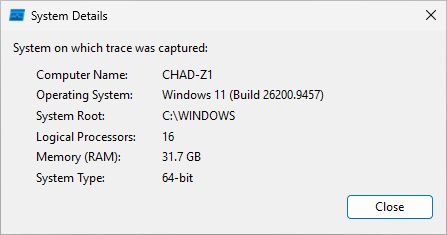
Windows 11, build 26200.9457.
Predict before running
Predict the next two calls
Existing handle
Current DACL allows
- Use the existing handle
- Open the file again
Experiment 1: remove write permission after opening
What happens to the writable handle we already have once the DACL stops allowing writes?
Return to the paused terminal from setup: start Procmon capture, then press Enter. If you haven’t started the runner yet, use:
.\Invoke-HandleLab.ps1 -Experiment 1 -Pause
Here’s what the script does:
- Set the disposable file’s experimental DACL to allow read and write.
- Acquire a
GENERIC_WRITEhandle with compatible sharing flags. - Change the DACL to permit reads and control operations, but no data writes.
- Call
WriteFileusing the handle from step 2. - Attempt a fresh
CreateFileW(..., GENERIC_WRITE, ..., OPEN_EXISTING, ...).
| Operation after the DACL change | Prediction |
|---|---|
WriteFile through the retained writable handle |
Succeeds |
New CreateFileW requesting GENERIC_WRITE |
Fails with ERROR_ACCESS_DENIED in this lab |
| Query the retained handle’s grant again | Its granted-access mask remains unchanged |
While paused, inspect the printed file path in a second normal PowerShell console:
icacls.exe "<the printed experiment-1.txt path>"
(Get-Acl -LiteralPath "<the printed experiment-1.txt path>").Sddl
The custom ACE includes control rights, so icacls may show a more detailed entry than Explorer’s “Read” checkbox suggests. Check the data-right bits separately.
The write starts after SetSecurityInfo returns. These are sequential calls, so an earlier queued write can’t explain the result:
[2] CreateFileW: retained writer -> SUCCESS
    Handle=0x960; Requested=0x40000000; measured GrantedAccess=0x00120196
[4] WriteFile: retained writer after narrowing DACL -> SUCCESS
    Handle=0x960; Requested=n/a; measured GrantedAccess=0x00120196
[6] CreateFileW: fresh writer after narrowing DACL -> FAILURE (Win32 5)
Handle 0x960 has the same measured grant at both points: 0x00120196.
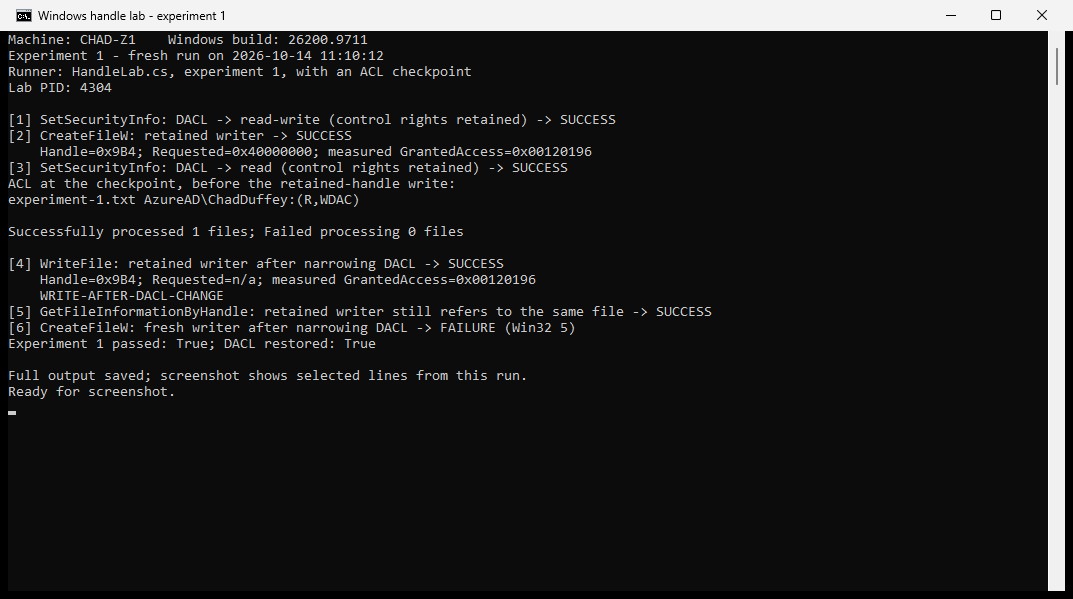
icacls shows (R,WDAC), but the existing handle can still write. A new writable open fails.
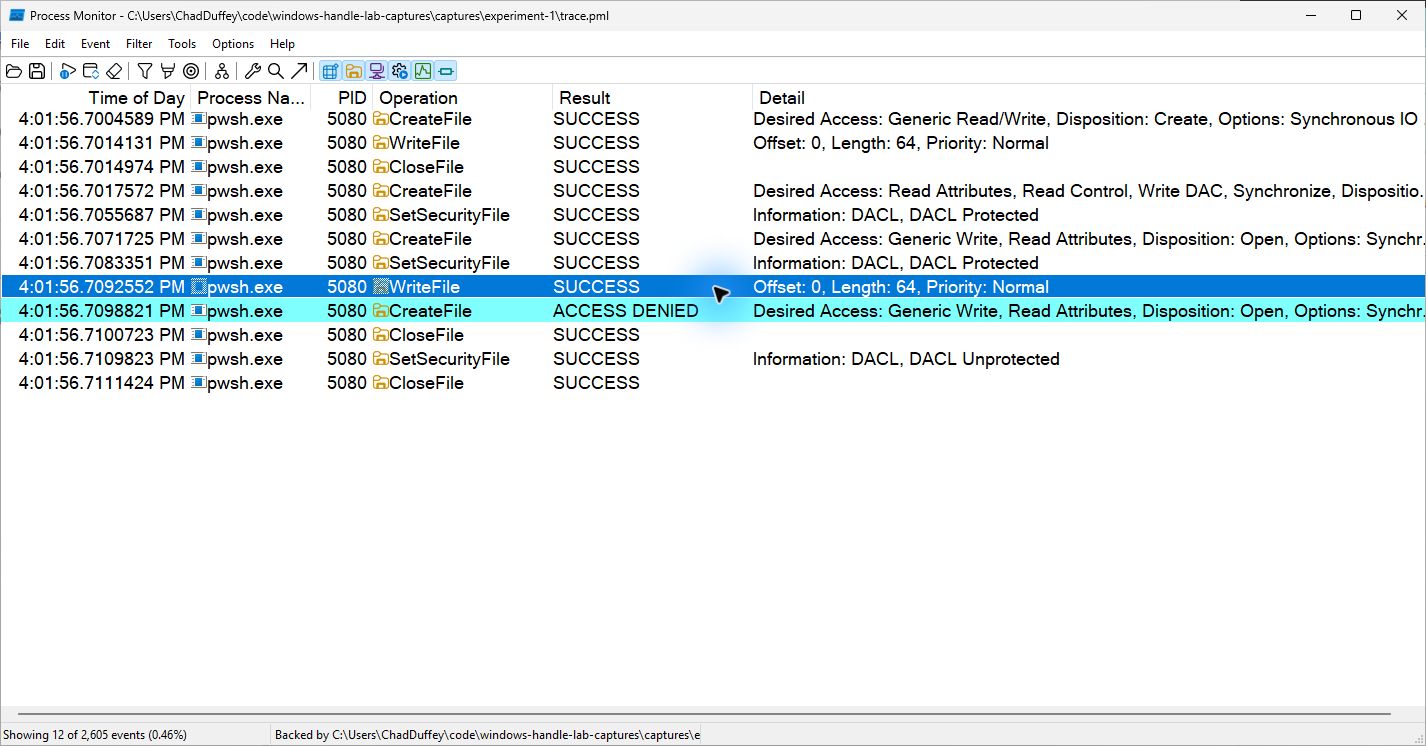
The old handle’s write succeeds; the new writable open gets ACCESS DENIED.
In Procmon, find the writer’s successful open and compare it with the denied one. Check their requested access and share modes, with the DACL change between them.
Experiment 2: allow writes after opening for reading
What about the opposite change? Open a reader, then allow writes in the DACL.
.\Invoke-HandleLab.ps1 -Experiment 2 -Pause
The script opens the file with GENERIC_READ, then changes the DACL to allow writes. It compares a write through that original read-only handle with one through a new writable handle.
| Operation after broadening the DACL | Prediction |
|---|---|
WriteFile through the original read-only handle |
Fails with ERROR_ACCESS_DENIED |
New CreateFileW requesting GENERIC_WRITE |
Succeeds |
WriteFile through that new writable handle |
Succeeds |
“Read-only” describes the handle here, not the separate FILE_ATTRIBUTE_READONLY file attribute.
[5] WriteFile: write through old read-only handle -> FAILURE (Win32 5)
    Handle=0x988; Requested=n/a; measured GrantedAccess=0x00120089
[6] CreateFileW: fresh writer after broadening DACL -> SUCCESS
    Handle=0x98C; Requested=0x40000000; measured GrantedAccess=0x00120196
[7] WriteFile: write through fresh writer -> SUCCESS
The old handle still has its read grant, 0x00120089. Allowing writes in the DACL made the new writer possible, but didn’t upgrade the old handle.
The rejected write doesn’t appear as a WriteFile event in this Procmon capture. The API did fail: it returned FALSE, with GetLastError reporting ERROR_ACCESS_DENIED (5). This is why we keep the API output as well as the trace.
Try requesting GENERIC_READ | GENERIC_WRITE before allowing writes. Will Windows reject the open or give you a read-only handle? An explicit request needs all the requested rights; MAXIMUM_ALLOWED works differently. Make this change in a copy of the source, and start a fresh PowerShell window: Add-Type can’t replace the wrapper already loaded in the current session.
Experiment 3: prove that the old reader sees new bytes
Perhaps the application is just returning bytes it buffered earlier. We can check that by writing something that didn’t exist before the DACL changed.
.\Invoke-HandleLab.ps1 -Experiment 3 -Pause
The runner opens two independent handles, a reader and a writer, and reads the initial marker. It then changes the DACL to control-only.
After changing the DACL, it generates a new marker containing a GUID and writes it through the old writable handle. It calls FlushFileBuffers, uses SetFilePointerEx to seek the old readable handle to offset zero, and calls ReadFile into a fresh buffer.
| Question | Prediction |
|---|---|
| Can the retained writer write the new marker? | Yes |
| Does the retained reader return that new marker? | Yes |
Can a new GENERIC_READ open succeed? |
No; ERROR_ACCESS_DENIED |
| Do the retained handles still identify the same underlying file? | Yes |
[6] WriteFile: new marker generated after DACL change -> SUCCESS
    Handle=0x98C; Requested=n/a; measured GrantedAccess=0x00120196
    AFTER-cc2e58083c6e42baa188f96b67ca7d7f
[8] ReadFile: fresh ReadFile through retained reader -> SUCCESS
    Handle=0x984; Requested=n/a; measured GrantedAccess=0x00120089
    AFTER-cc2e58083c6e42baa188f96b67ca7d7f
[10] GetFileInformationByHandle: reader identity after DACL change -> SUCCESS
    C840BBE7:004C000000030319
[11] GetFileInformationByHandle: writer identity after DACL change -> SUCCESS
    C840BBE7:004C000000030319
[12] CreateFileW: fresh reader after denying data access -> FAILURE (Win32 5)
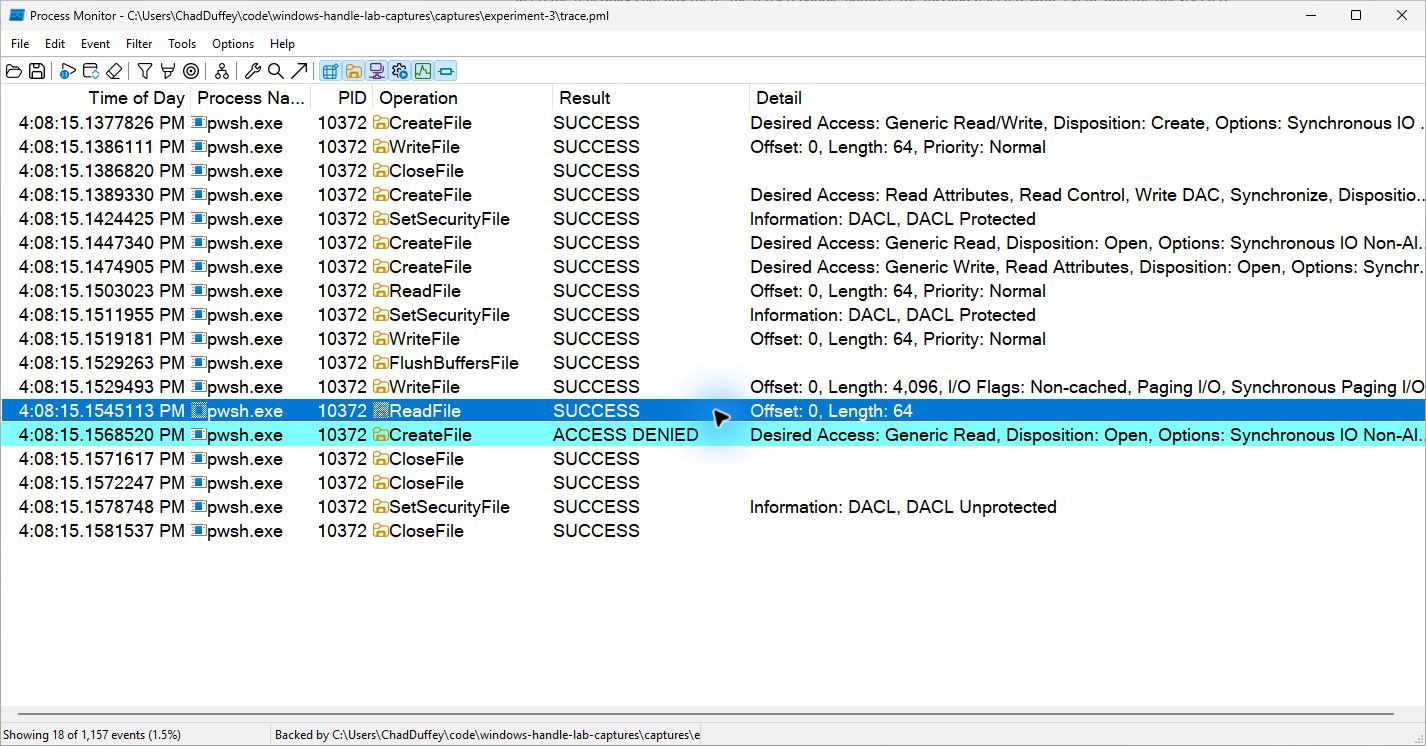
The retained reader’s successful read is selected, with the denied new open below it. The marker itself is in the output above.
The new marker rules out the application’s old buffer. It doesn’t prove a physical disk read: Windows may serve those bytes from its file cache, even after the writer flushes.
The matching IDs above come from the volume serial number and file index returned by GetFileInformationByHandle. They confirm that both handles still refer to the same NTFS file. The test doesn’t rename or replace it.
Keep your JSON with the trace. Procmon gives you the ordering, offsets, and lengths; the JSON records the bytes returned.
Experiment 4: duplicate an open handle
What if the program duplicates an already-open handle after the DACL changes?
.\Invoke-HandleLab.ps1 -Experiment 4 -Pause
After opening a read/write handle and changing the DACL to control-only, the script calls DuplicateHandle to make two copies in the same process:
- a
DUPLICATE_SAME_ACCESScopy; - a duplicate requesting only
GENERIC_READ.
It closes the original before using either copy. The same-access copy still writes; the reduced copy reads but can’t write. Neither needed a new file open under the changed DACL.
For file handles, DuplicateHandle has a documented limit: a GENERIC_READ handle can’t be upgraded to GENERIC_READ | GENERIC_WRITE. The final check tries that after allowing writes in the DACL again. It still fails. Some other object types do allow increased access during duplication.
Duplicated file handles also share the file position. Two independent CreateFileW opens can have independent positions, as the DuplicateHandle documentation explains.
Both duplicates refer to the original FILE_OBJECT, despite having different rights. In a kernel debugger, compare their object pointers and granted masks. The shared FILE_OBJECT.WriteAccess field can’t tell you whether a particular duplicate can write.
[4] DuplicateHandle: DUPLICATE_SAME_ACCESS after DACL change -> SUCCESS
    Handle=0x9B4; Requested=n/a; measured GrantedAccess=0x0012019F
[5] DuplicateHandle: read-only duplicate after DACL change -> SUCCESS
    Handle=0x890; Requested=0x80000000; measured GrantedAccess=0x00120089
[6] WriteFile: same-access duplicate after original closed -> SUCCESS
[8] WriteFile: write through read-only duplicate -> FAILURE (Win32 5)
[10] DuplicateHandle: file duplicate cannot upgrade read-only to read-write -> FAILURE (Win32 5)
To see the shared position for yourself, duplicate a readable handle, seek to zero, then read one byte through each without seeking again. Does the second read return byte zero or byte one? Compare with two independent opens. Keep this single-threaded so you can follow the position.
Duplication into another process requires suitable process handles with PROCESS_DUP_HANDLE access. Passing the handle’s numeric value alone won’t work. A service that duplicates a writable handle into a client gives it that access, even if the client couldn’t open the file itself.
What a compromised process can still access
Suppose an application opens a writable handle and keeps it. An administrator later removes write permission from the file’s DACL. If an attacker then gains execution inside the application, through an exploitable bug or code injection, their code can call WriteFile using that retained handle.
For the local-file operations we’re testing, the write can still succeed. The CreateRemoteThread documentation describes a new thread’s access to objects opened by its process.
A file handle doesn’t bypass process access controls or grant permission to inject. Its rights haven’t increased either: a read-only handle remains read-only, and sharing, locks, and other I/O constraints still apply.
An attacker with PROCESS_DUP_HANDLE access to the source process and a valid handle value there could instead use DuplicateHandle to copy it into their own process. The call also needs a suitable target-process handle, such as GetCurrentProcess() for their own process.
You can test the shared-handle part without injecting into another process. In a copy of the C++ lab, pass the old writable handle to a new worker thread after the DACL change. Compare its write with a new writable open, then wait for the worker before cleanup.
Experiment 5: when sharing blocks the open
So far we’ve used compatible sharing flags. For this test, keep the DACL permissive and make the data handle exclusive.
.\Invoke-HandleLab.ps1 -Experiment 5 -Pause
The runner opens a data handle with share mode zero, then tries a new readable open. Expect ERROR_SHARING_VIOLATION (32). After the exclusive handle closes, the same readable open should succeed without a DACL change.
Sharing checks work both ways: existing opens must allow the new access, and the new share mode must allow theirs. FILE_SHARE_WRITE allows compatible writable opens; it doesn’t grant write permission. See the CreateFileW sharing rules.
The control handle only requests metadata and security rights, so it doesn’t conflict with this exclusive data open.
Here’s the failed open, followed by the retry after closing the exclusive handle:
[2] CreateFileW: exclusive handle (share mode zero) -> SUCCESS
    Handle=0x9CC; Requested=0xC0000000; measured GrantedAccess=0x0012019F
[3] CreateFileW: allowed by DACL, blocked by sharing -> FAILURE (Win32 32)
[4] CreateFileW: open after exclusive handle closes -> SUCCESS
    Handle=0x9CC; Requested=0x80000000; measured GrantedAccess=0x00120089
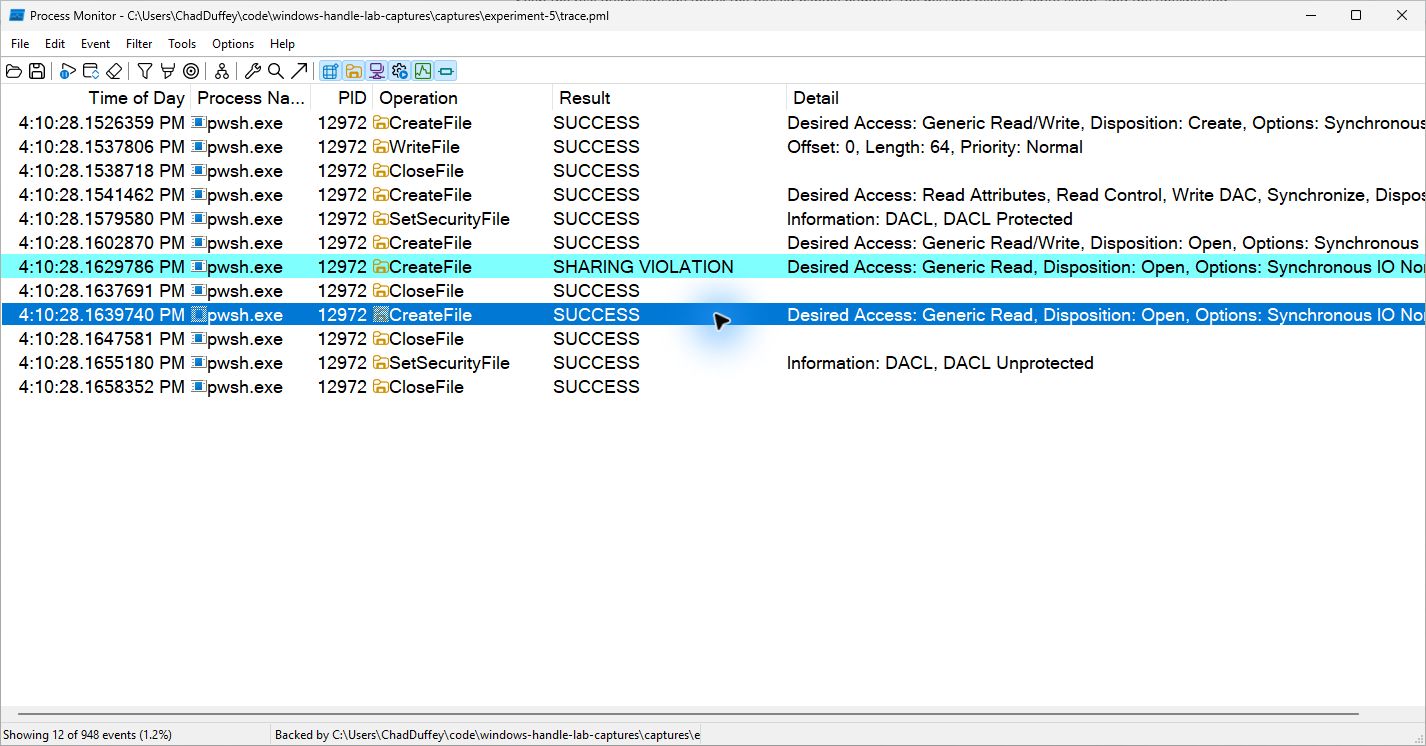
The open succeeds once the exclusive handle closes. The DACL hasn’t changed.
Notice that both handles printed 0x9CC in this run. The exclusive handle was closed; the new reader reused the numeric value. Compare handle lifetimes and granted access, not just the number.
Compare error 32 here with error 5 in experiment 1. “Couldn’t open the file” isn’t enough detail to blame the ACL. There are other reasons an open can fail, too.
Experiment 6: a mapped view outlives the file handle
A mapped view makes file bytes accessible through an address in the process’s memory. This time, keep a read-only view after closing the data-file handle.
.\Invoke-HandleLab.ps1 -Experiment 6 -Pause
The runner opens a readable handle and creates an unnamed PAGE_READONLY mapping with CreateFileMappingW. After mapping a FILE_MAP_READ view, it removes data-read permission from the DACL and closes the original data-file handle. It then reads through the mapped address.
| Operation | Prediction |
|---|---|
| Read bytes through the existing read-only mapped view | Continues to work in this lab |
New CreateFileW requesting GENERIC_READ |
Fails with ERROR_ACCESS_DENIED |
| Write through that read-only view | Not permitted by its protection; intentionally not attempted |
This reads memory, not ReadFile. CreateFileMappingW needs a file handle whose access supports PAGE_READONLY; MapViewOfFile checks the mapping handle’s access and the mapping’s protection for FILE_MAP_READ. These checks don’t mean each memory read rechecks the file’s DACL.
Closing the data-file handle doesn’t unmap the view. The file handle, mapping object, and view have separate lifetimes, as the MapViewOfFile and mapping cleanup documentation explain. The lab’s separate DACL control handle stays open for cleanup.
The file stays the same size throughout this test. Paging or storage errors can still make a mapped read fail.
[3] CreateFileMappingW: unnamed PAGE_READONLY section -> SUCCESS
[4] MapViewOfFile: FILE_MAP_READ view -> SUCCESS
[5] SetSecurityInfo: DACL -> control-only (control rights retained) -> SUCCESS
[6] Memory read: existing mapped view after file handle closes -> SUCCESS
    BEFORE-DACL-CHANGE
[7] CreateFileW: fresh reader while view remains -> FAILURE (Win32 5)
There is no post-close ReadFile event for this memory access in the trace. Procmon does show FILE LOCKED WITH ONLY READERS during section creation. Despite the wording, CreateFileMappingW succeeded and returned a valid handle. This is a native status, 0x0000012A, listed in Microsoft’s NTSTATUS reference.
Read the same experiment in C++
The C++ companion compares existing handles with new opens and adds the impersonation test below.
Build the native companion from a Visual Studio Developer PowerShell with the C++ build tools and Windows SDK installed:
cl /std:c++17 /EHsc /W4 .\HandleLab.cpp /Fe:HandleLab.exe /link Advapi32.lib
.\HandleLab.exe --pause
The recorded runs used GCC/MinGW-w64; the README has that build command. The MSVC command above hasn’t been tested yet.
The post-change write is this call:
const BOOL success = WriteFile(
    retainedWriter,
    data.data(),
    static_cast<DWORD>(data.size()),
    &written,
    nullptr);

const DWORD error = success ? ERROR_SUCCESS : GetLastError();
retainedWriter was acquired before the DACL change. Capture GetLastError immediately if the call fails, and check written as well as the Boolean result.
For the permissions change, the program describes a protected, current-user-only DACL in SDDL, Windows’ text format for security descriptors. It parses that string, extracts the DACL pointer (PACL), and passes it to SetSecurityInfo:
const DWORD error = SetSecurityInfo(
    controlHandle,
    SE_FILE_OBJECT,
    DACL_SECURITY_INFORMATION | PROTECTED_DACL_SECURITY_INFORMATION,
    nullptr,
    nullptr,
    replacementDacl,
    nullptr);
WRITE_DAC permits the change. PROTECTED_DACL_SECURITY_INFORMATION prevents inherited entries from granting data access again. SDDL writes this protection as D:P; see the SDDL overview and string format.
The DACL pointer refers to memory inside its security descriptor. Keep the replacement descriptor allocated until SetSecurityInfo returns, and the original until restoration finishes. The C++ cleanup objects release memory with LocalFree and handles with CloseHandle when they leave scope.
Watch the failure values: CreateFileW returns INVALID_HANDLE_VALUE, while CreateFileMappingW returns NULL. Checking only for null would miss a failed file open.
Experiment 7: change the token instead of the DACL
Keep the DACL constant and change the thread’s token. The C++ program restricts a copy of its own token; no second account is needed.
.\HandleLab.exe --impersonation --pause
After the DACL test, the program allows data access again and acquires a read/write handle. It then calls CreateRestrictedToken with DISABLE_MAX_PRIVILEGE and S-1-0-0 as a restricting SID. The flag disables privileges except SeChangeNotifyPrivilege; the user SID stays the same. The file’s DACL grants data rights to that user SID, but not to the restricting SID.
For a restricted token with restricting SIDs, the DACL check has two parts: one using the token’s ordinary SIDs, and one using its restricting SIDs. Both must allow the requested rights. Here the second part can’t grant data access. We’re not changing accounts or integrity level.
With ImpersonateLoggedOnUser active on the current thread, the expected results are:
| Operation | Prediction |
|---|---|
| Fresh readable open while restricted impersonation is active | Fails |
| Write using the read/write handle acquired before impersonation | Succeeds |
| Read using that same retained handle | Succeeds |
| Fresh readable open after reverting impersonation | Succeeds |
The program verifies that impersonation succeeded and calls RevertToSelf after the test. If reversion fails, it terminates rather than continuing with the restricted token active.
Requested 0x80000000; fresh open under restricted impersonation: FAILURE (Win32 5)
retained handle writes while impersonating: SUCCESS (Win32 0)
retained handle reads while impersonating: SUCCESS (Win32 0)
    Marker: WRITE-WHILE-IMPERSONATING
Requested 0x80000000; fresh open after RevertToSelf: SUCCESS (Win32 0)
Original DACL restored and verified.
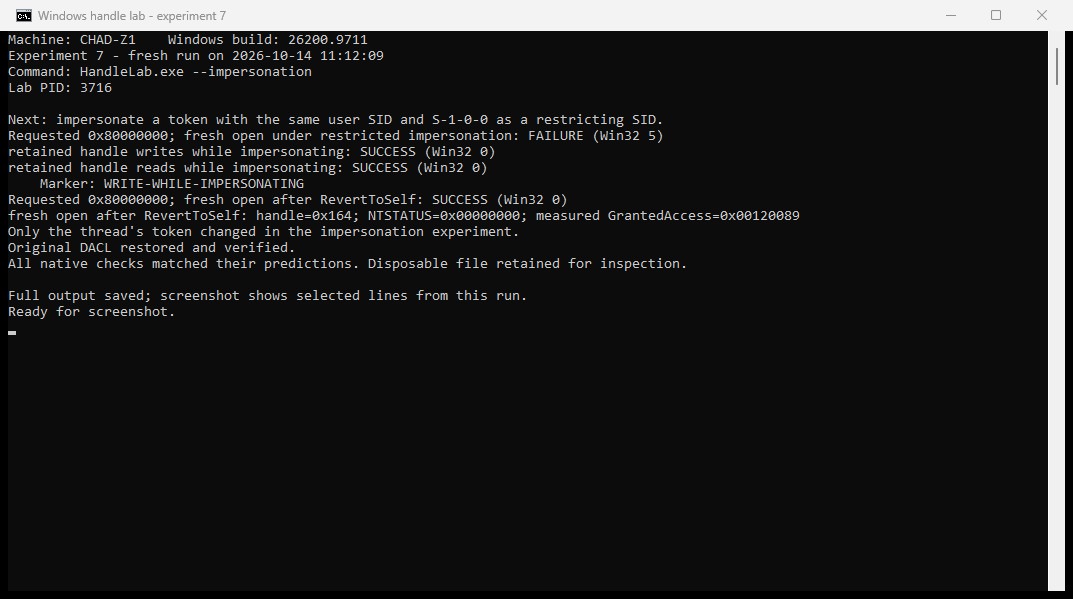
The old handle reads and writes during restricted impersonation. After RevertToSelf, a new readable open succeeds.
A service impersonating a less privileged client may likewise retain handles it opened before impersonation. Impersonation alone doesn’t make arbitrary client code safe to run inside that process.
Reading the Procmon trace
To capture another experiment:
- Open Procmon as administrator.
- Run one experiment with
-Pausein a normal PowerShell window. - Filter to its printed PID and run folder, then start capture.
- Press Enter. At the next pause, inspect the ACL and open handles.
- Resume, then save the completed trace as a PML beside the run’s JSON and environment record.
The runner copies setup’s environment.json if available, so you can keep the environment record with each run’s results.
Inspect the opens, security changes, reads, and writes: paths, offsets, lengths, and results. Procmon’s event labels and native error names may differ from the API names and Win32 errors in the JSON.
Don’t expect one Procmon row for every API call. A call can produce several filesystem operations, or fail before reaching the filesystem at all. Compare the API journal with the trace rather than counting rows.
The evidence ZIP contains the recorded API journals, console output, and target-file CSV exports. Account identifiers and local paths are replaced with placeholders; results, timestamps, masks, and markers are unchanged. Its README explains the records and includes commands to inspect them.
Procmon’s Desired Access tells you what the open requested; the runner’s NtQueryObject result tells you what the handle received. Also check file identity: a successful write and denied open at the same path could involve different files if something replaced the file between calls.
Optional WinDbg inspection
To inspect the grants in WinDbg, attach in user mode to a separate paused run and use !handle. Attaching changes timing.
!handle 0 f File
Locate the lab file and compare granted access before and after the DACL change. User-mode debugging won’t let you inspect the kernel’s FILE_OBJECT directly.
If your VM supports kernel debugging, use !handle in the lab process’s context to find the object, then inspect it with !fileobj. Use symbols for your Windows build, not addresses or offsets from another session.
Other reasons access can fail
These tests use ordinary local NTFS files. The DACL isn’t the only access control involved: Mandatory Integrity Control can deny access even when the DACL allows it. Privileges, token restrictions, device policy, and filesystem filters can affect the outcome too. Storage errors can also interrupt reads or writes through an otherwise valid handle.
Directory permissions and redirection through junctions or other reparse points can affect an open; Microsoft’s traverse-check discussion covers the directory checks. The runner checks for reparse-point ancestors and records file identity, but isn’t designed to defend against concurrent path replacement. The tests are synchronous and single-threaded. If you add concurrent opens or DACL changes, you’ll need synchronization, not just pause points.
The rights are operation-specific. FILE_WRITE_DATA doesn’t authorize deletion, renaming, security changes, or every device-control request. Registry keys, processes, tokens, and devices have their own sets of rights.
Files on an SMB network share need separate tests. The server’s handles, authentication, share permissions, and session state all matter, including whether it rechecks access or closes a handle. Don’t assume these local results describe a network share.
Stopping existing access
In an application you control, coordinate all the work using the file: stop new requests, deal with pending I/O, flush where needed, close handles, and unmap views. Include duplicated and inherited handles. Finding and closing handles one by one isn’t atomic; work can continue while you’re closing them.
CloseHandle releases one handle, not its duplicates or mapped views. For pending I/O, CancelIoEx can request cancellation of overlapped (asynchronous) operations; CancelSynchronousIo targets a thread’s synchronous operations. These cancellation calls don’t revoke handle rights or wait for completion. An operation can still complete normally if it finishes before cancellation takes effect.
A service that promises to check permission on every request must do so before using a cached file handle for a client. Reopening under the client’s token may help, but path handling and races still matter. Once the client has a writable handle, it can use it without returning to the service’s policy check.
If an application still writes after a permissions change, inspect the handle passed to WriteFile: when it opened, its rights, and which file it identifies. Then compare a new open under the same token against the current DACL.
Cleanup
Check the JSON before running another experiment. It records the saved and restored DACLs and flags a mismatch or failed cleanup as a failed run.
The runners restore the DACL on completion or a handled error. Killing the process or powering off the VM can interrupt cleanup. Restore-HandleLab.ps1 restores only the DACL from the saved backup and checks the result. The README has the recovery command.
Use the disposable files the lab creates, not a file you care about.
Test environment
The Procmon captures are from Windows 11 Business build 26200.9457, x64, using PowerShell 7.6.5 and Procmon 4.11. The C++ build used GCC/MinGW-w64 16.2.0, with warnings treated as errors. All seven experiments passed, and each original DACL was restored.
The six PowerShell experiments also passed under Windows PowerShell 5.1. The recovery helper was tested separately. Both PowerShell runs and the C++ checks were repeated without Procmon capture on 14 October.
The PMLs were recorded on 13 October 2026. The Procmon screenshots, including build information, were taken from those traces on 14 October. The cropped terminal screenshots show repeat runs that day on build 26200.9711, with cleanup verified. Output blocks come from the original runs; experiment 1’s excerpt uses its JSON journal. Handle numbers and granted masks can vary between runs and builds.
These results are from one x64 machine. MSVC, ARM64, a separate reader VM, and the optional WinDbg and worker-thread exercises haven’t been tested yet. The predictor and diagram are models, not traces.